



Reinventing Enterprise Data
Ingestion with Databricks
Lakeflow Connect
A practical, modern approach to fixing real ingestion challenges
Data sits at the center of every modern analytics and AI initiative, yet most enterprises still struggle to make it reliably usable at scale. Recent industry research makes the gap clear: the World Economic Forumhighlights data fragmentation and poor interoperability as core blockers to enterprise data readiness, Gartner identifies data quality and integration complexity as leading barriers to scaling analytics and AI, and Deloitte continues to report that infrastructure and integration challenges prevent many enterprises from operationalizing advanced data use cases (World Economic Forum, Gartner, Deloitte).
In practice, this means enterprises are collecting more data than ever, but still struggling to move it, trust it, and use it effectively.
This is where modern ingestion architectures, and specifically Databricks Lakeflow Connect, play a critical role.
The Reality of Traditional Data Ingestion
Most enterprises still rely on a patchwork of ingestion tools and processes:
- Separate ETL platforms for different source systems
- Batch-based pipelines running on fixed schedules
- Manual orchestration and error handling
- Limited visibility into failures, lineage, or schema changes
Over time, this leads to familiar issues:
- Rising costs driven by usage-based pricing and duplicated tooling
- Operational complexity from managing multiple platforms and connectors
- Delayed insights caused by batch ingestion and downstream dependencies
- Data quality gaps that undermine trust in analytics and AI
When an enterprise client approached us to modernize their Salesforce data ingestion, these challenges were already impacting reporting timelines, operational visibility, and cost predictability.
The requirement was clear: simplify ingestion, reduce dependency on third-party tools, and ensure data is always analytics ready.
What is Databricks Lakeflow Connect?
Databricks Lakeflow Connect is a native data ingestion framework built directly into the Databricks Lakehouse platform. Instead of relying on external ETL tools, it enables enterprises to ingest data straight into Delta Lake using managed, scalable pipelines.
At a structural level, Lakeflow Connect provides:
- Native connectors for enterprise systems such as Salesforce, SQL Server, SAP, ServiceNow, Dynamics 365, and more
- Incremental and streaming ingestion without custom change-data logic
- Tight integration with Delta Live Tables, Unity Catalog, and Delta Lake
- Built-in schema evolution, checkpointing, and monitoring
The result is a unified ingestion layer that lives where your analytics already run—reducing friction, cost, and operational overhead.
End-to-End Implementation: Salesforce to Databricks Lakehouse
Below is the complete implementation flow:
Step 1: Selecting the Connector
From the Databricks workspace, navigate to:
Jobs & Pipelines → Data Ingestion → Add Data
Databricks provides native connectors for commonly used enterprise systems, eliminating the need for external tools or custom APIs.
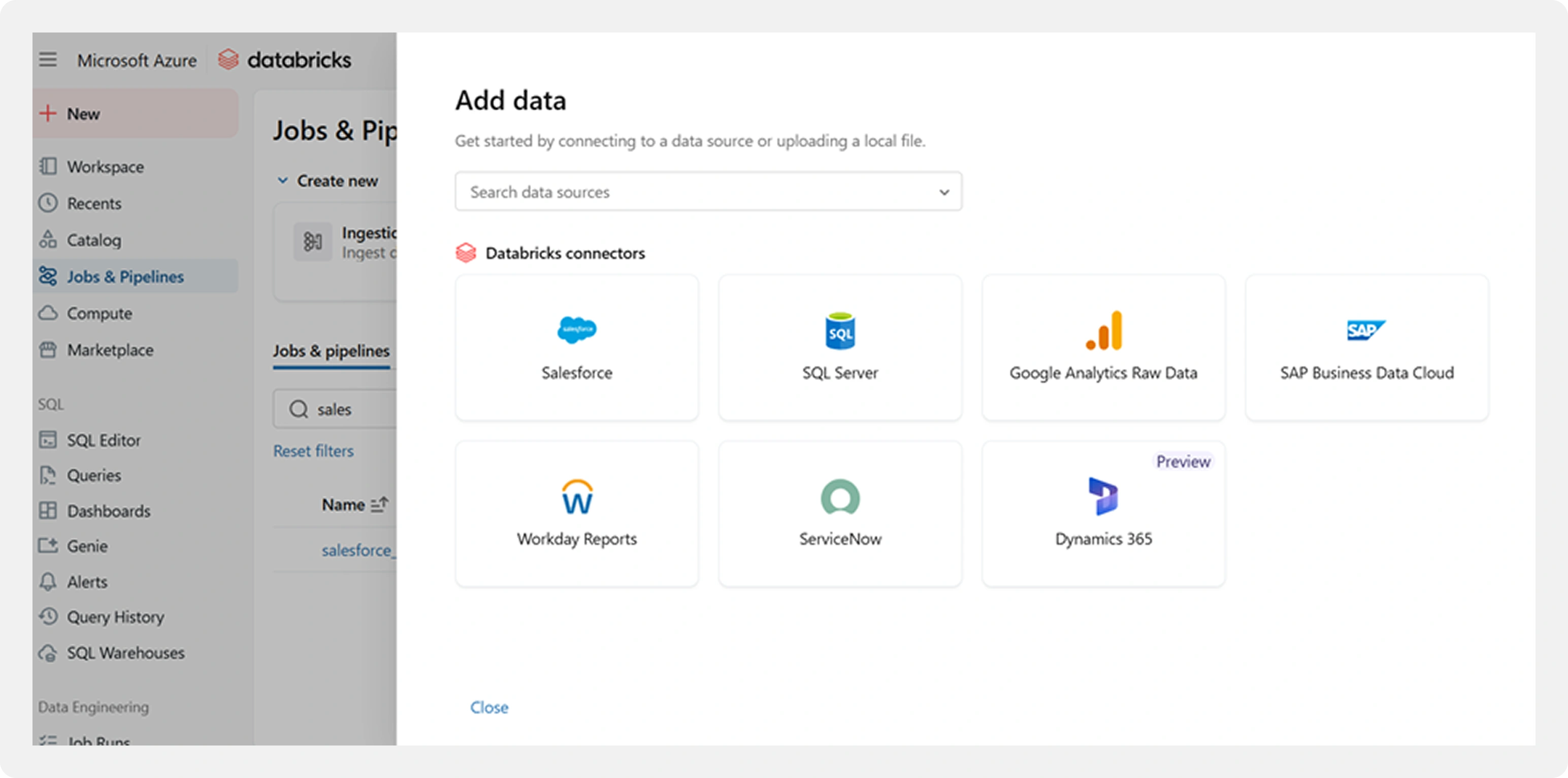
Available Connectors:

Salesforce

SQL Server

SAP Business Data Cloud

Google Analytics (raw data)

Workday Reports

ServiceNow

Dynamics 365
Why This Matters: Unlike traditional ingestion platforms that charge per connector or per volume of data, Lakeflow Connect includes these connectors as part of the Databricks platform itself.
Step 2: Connection Setup and Authentication
For Salesforce, the connection is configured using OAuth 2.0 authentication.
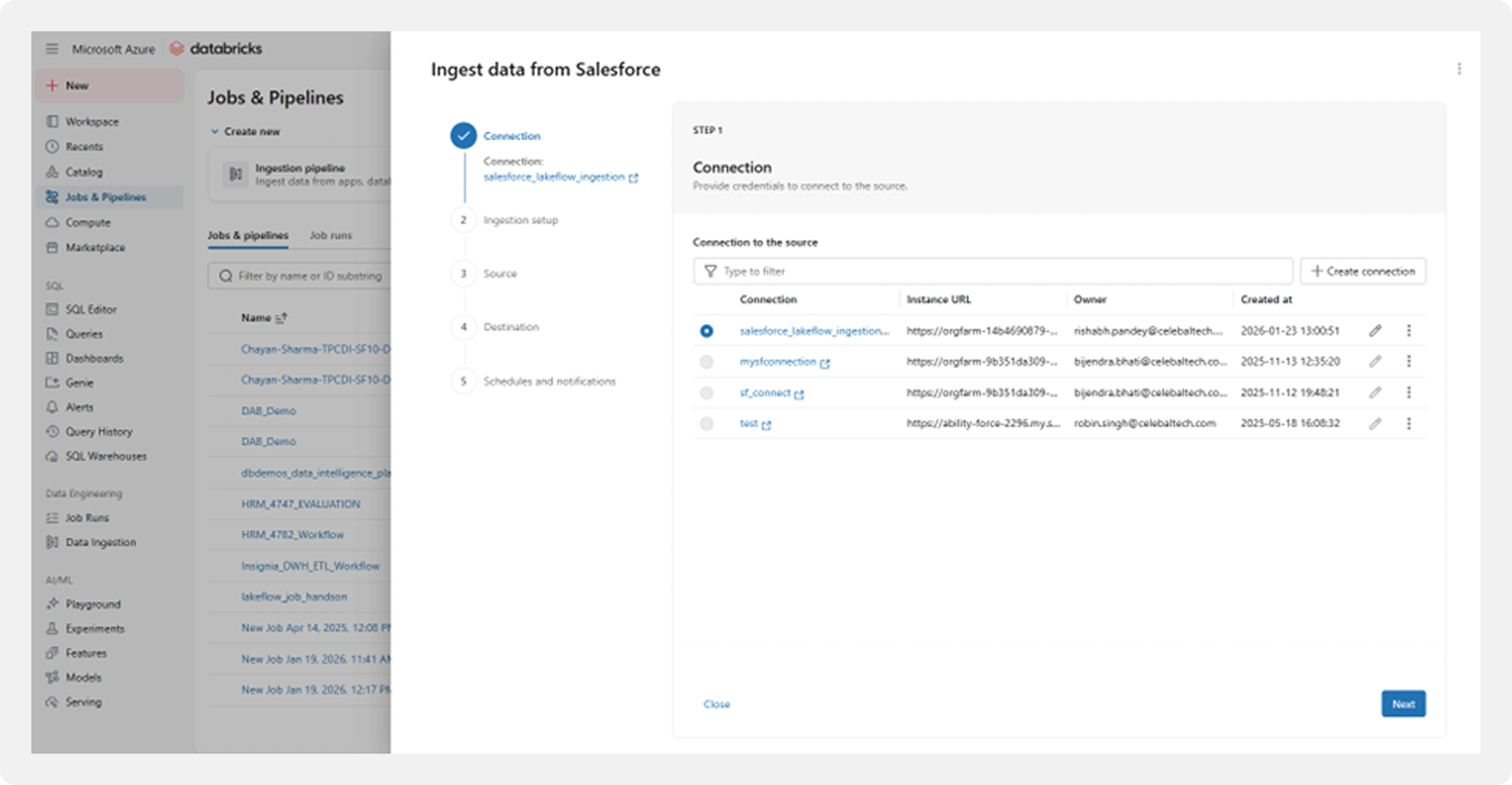
Key Configuration Details:
Connection Name
Salesforce instance URL (production or sandbox)
OAuth-based authentication
Security is handled natively:
- Credentials are stored using Databricks Secrets
- Tokens are refreshed automatically
- No sensitive information is embedded in notebooks or configurations
- Access is governed through Unity Catalog permissions
Step 3: Pipeline Configuration
Once the connection is validated, Lakeflow Connect guides you through creating a Delta Live Tables (DLT) ingestion pipeline.
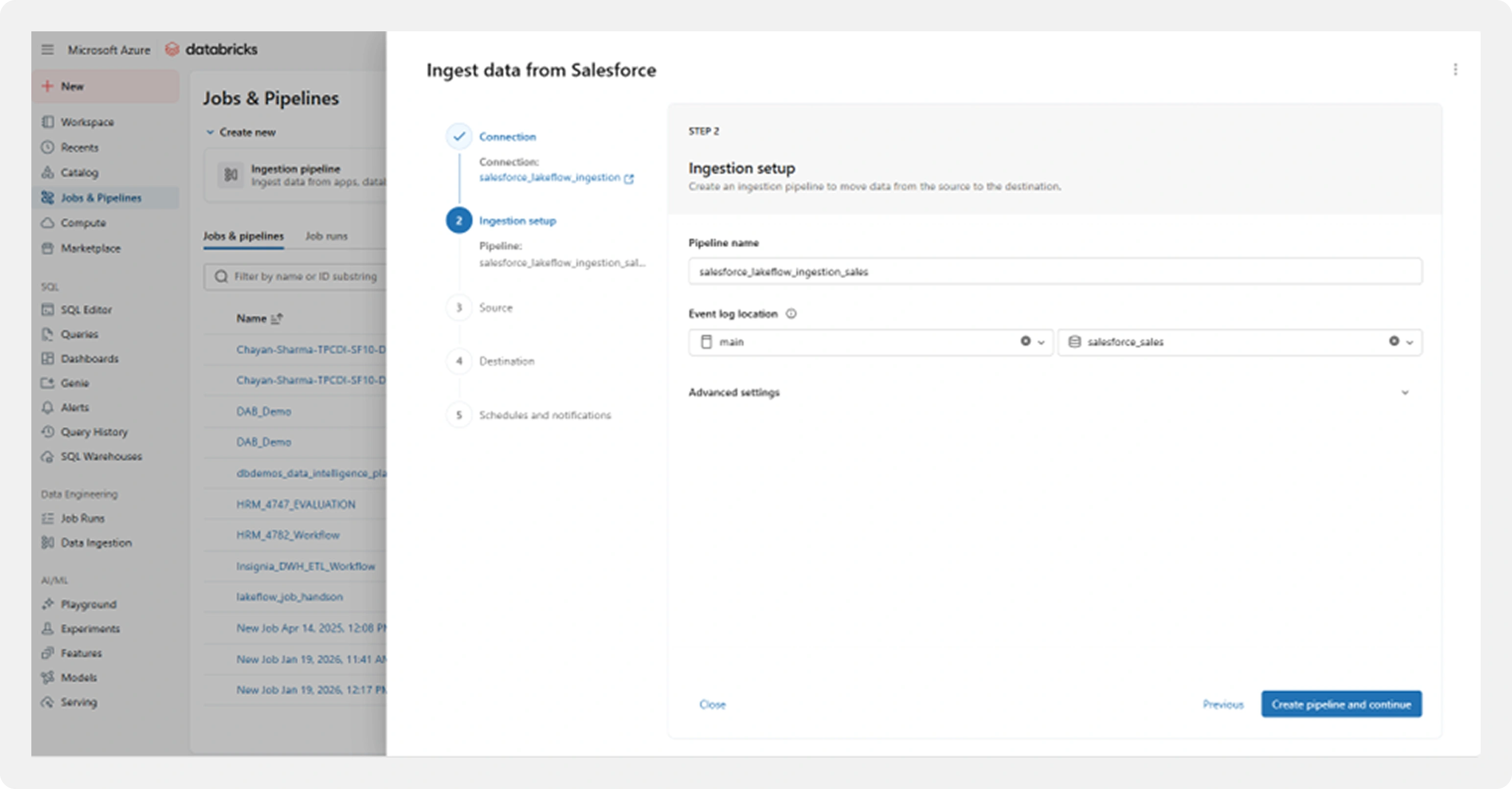
Key pipeline components:
- Pipeline name and storage location
- Event logs for monitoring and auditing
- Configuration for incremental ingestion
- Built-in error handling and retry logic
Behind the scenes, Databricks sets up:
- Streaming ingestion
- Checkpointing for fault tolerance
- Schema evolution to handle metadata changes
All of this is managed without manual orchestration scripts.
Step 4: Source Data Selection
Rather than ingesting every available Salesforce object, Lakeflow Connect allows for granular selection.
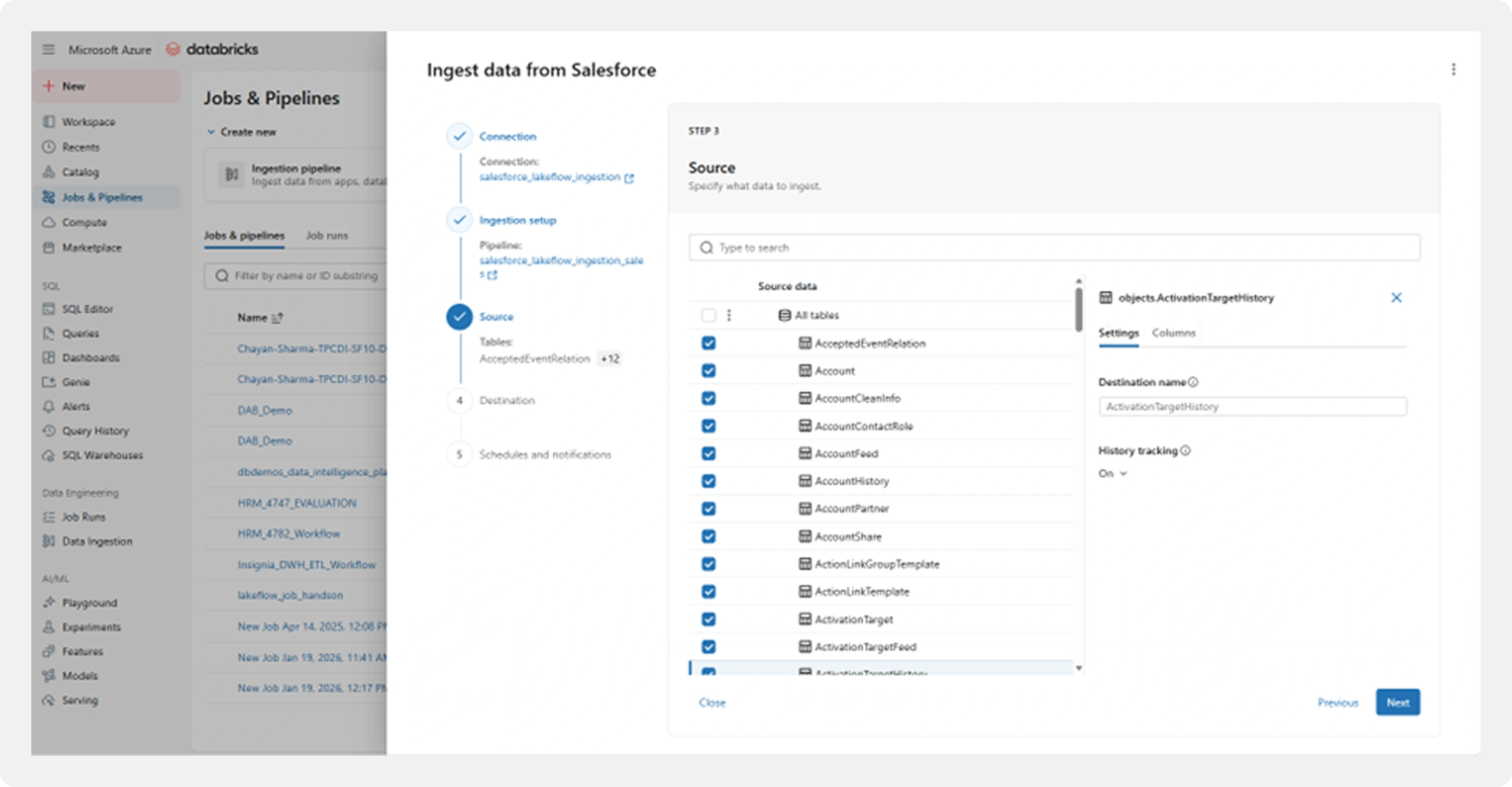
In this implementation:
- Only business-critical Salesforce objects were selected
- Unnecessary objects were excluded
This significantly reduced:
- Data volume
- API usage
- Storage and processing costs
Cost Impact: By selecting only 13 critical objects instead of all 100+ available, we reduced data volume by 75% and avoided unnecessary API calls, resulting in massive cost savings.
Step 5: Destination Configuration
Selected Salesforce objects are mapped directly to Delta tables in the target catalog and schema.
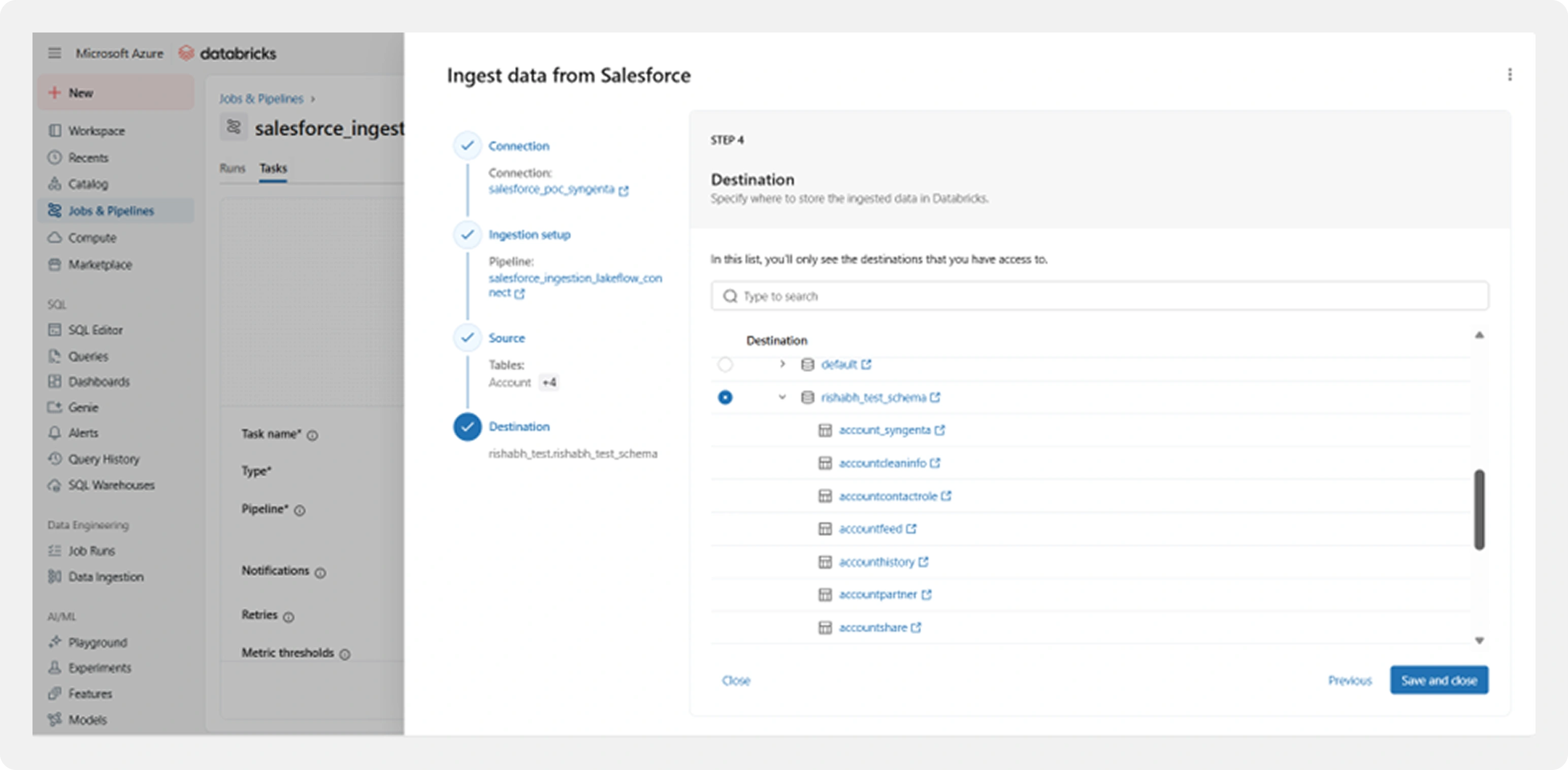
Destination setup includes:
- Catalog and schema selection
- Automatic table creation
- Built-in support for:
- Change Data Capture (CDC)
- Schema evolution
- Time travel
- Data quality checks
This ensures data is immediately analytics-ready upon ingestion.
Step 6: Pipeline Execution and Monitoring
Once configured, the pipeline can be executed immediately.
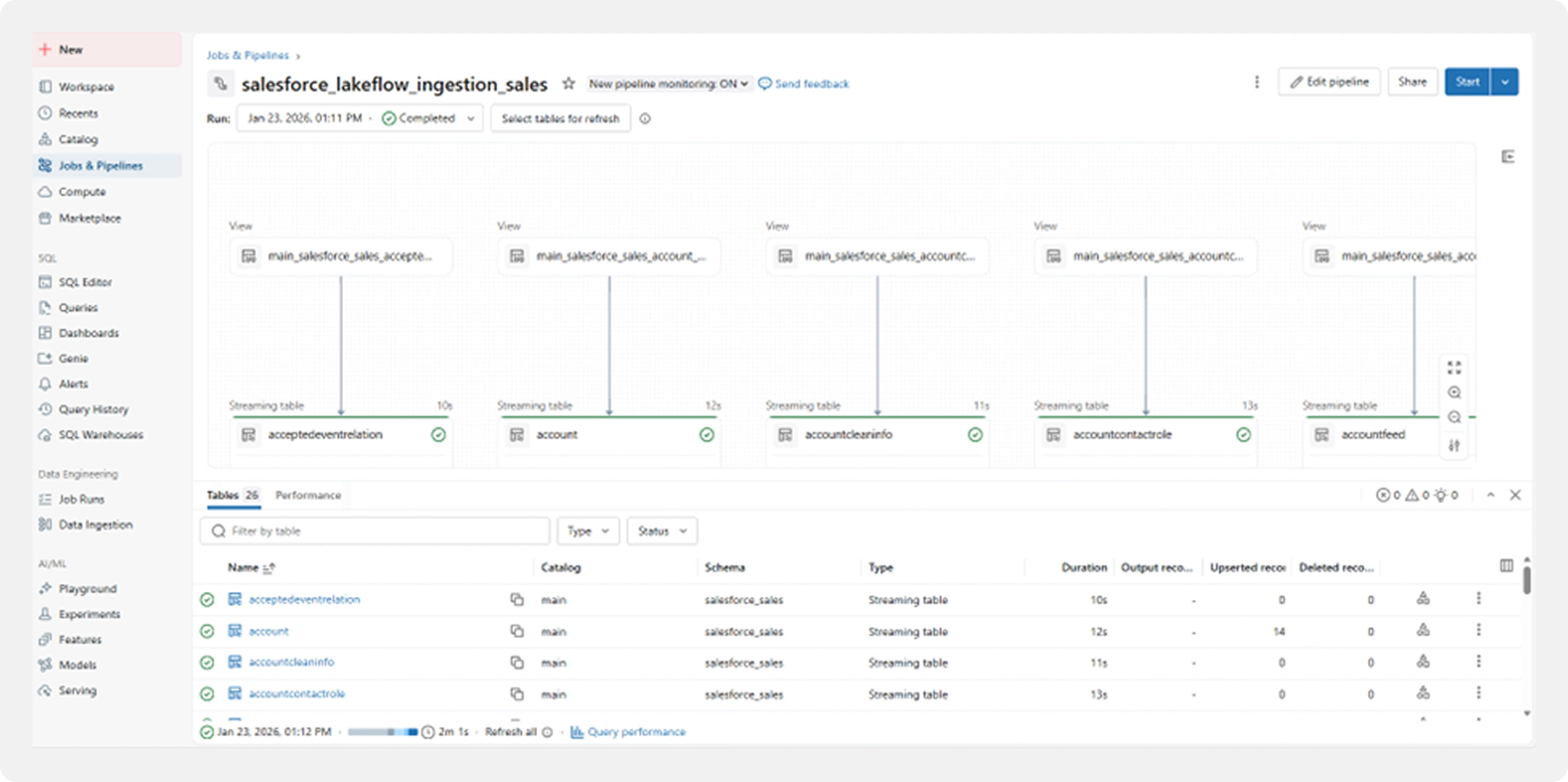
Real-time Metrics:
Execution Time
3-43 seconds per table (varies by size)
Records Processed
Streaming tables with continuous updates
Success Status
Green checkmarks for completed ingestions
Data Quality
Upserted records
The monitoring interface provides:
- Execution status for each table
- Processing times
- Record counts
- Visibility into successes and failures
Smaller tables ingest within seconds, while larger tables scale automatically based on volume.
Incremental runs process only changed data, keeping execution efficient.
Step 7: Scheduling and Notifications
For production readiness, pipelines can be scheduled to run automatically.
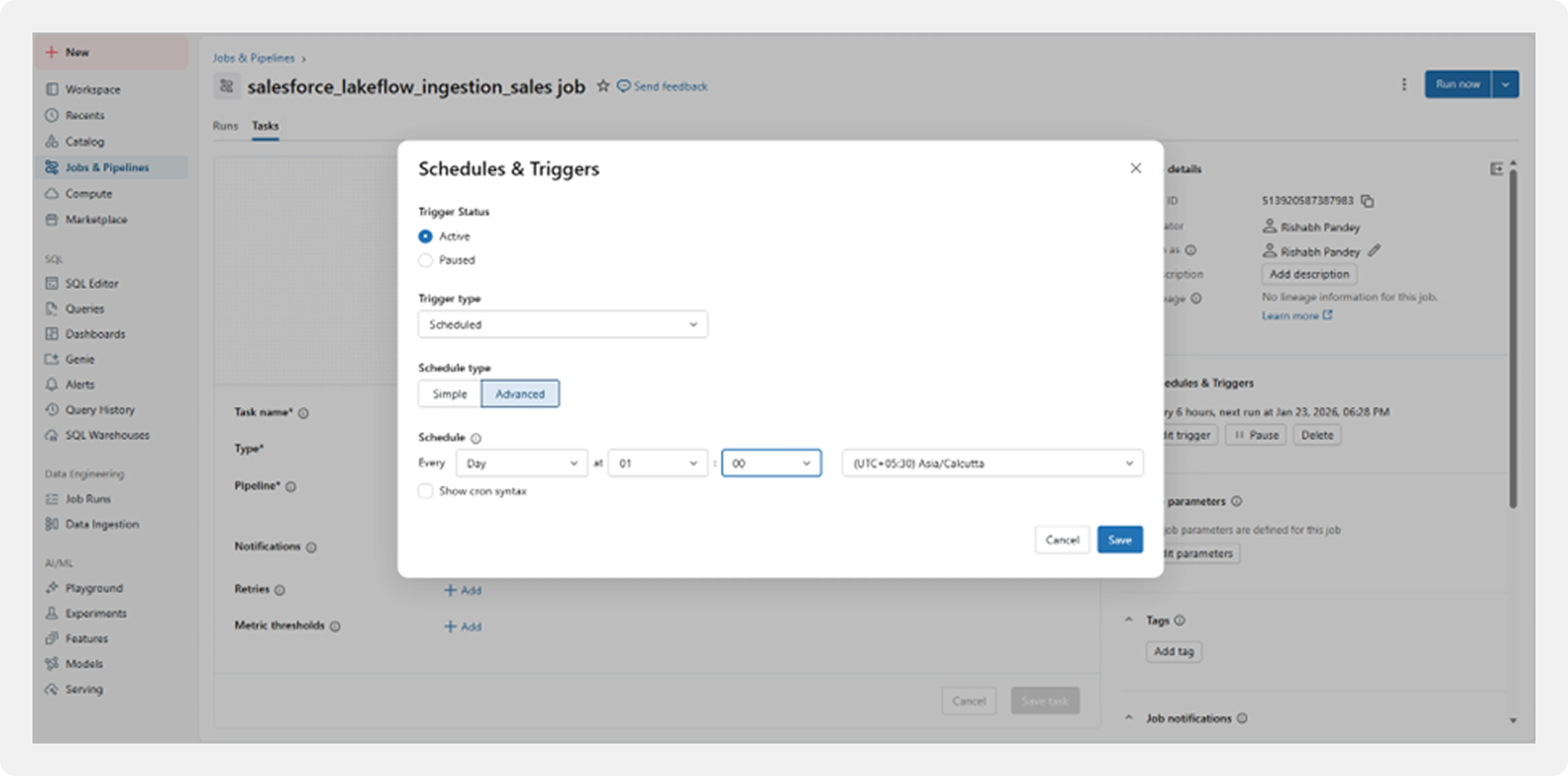
Configuration options include:
Execution frequency (daily or as required)
Active triggers
Email notifications on failure
Time zone configuration
This ensures ingestion runs reliably with minimal manual intervention.
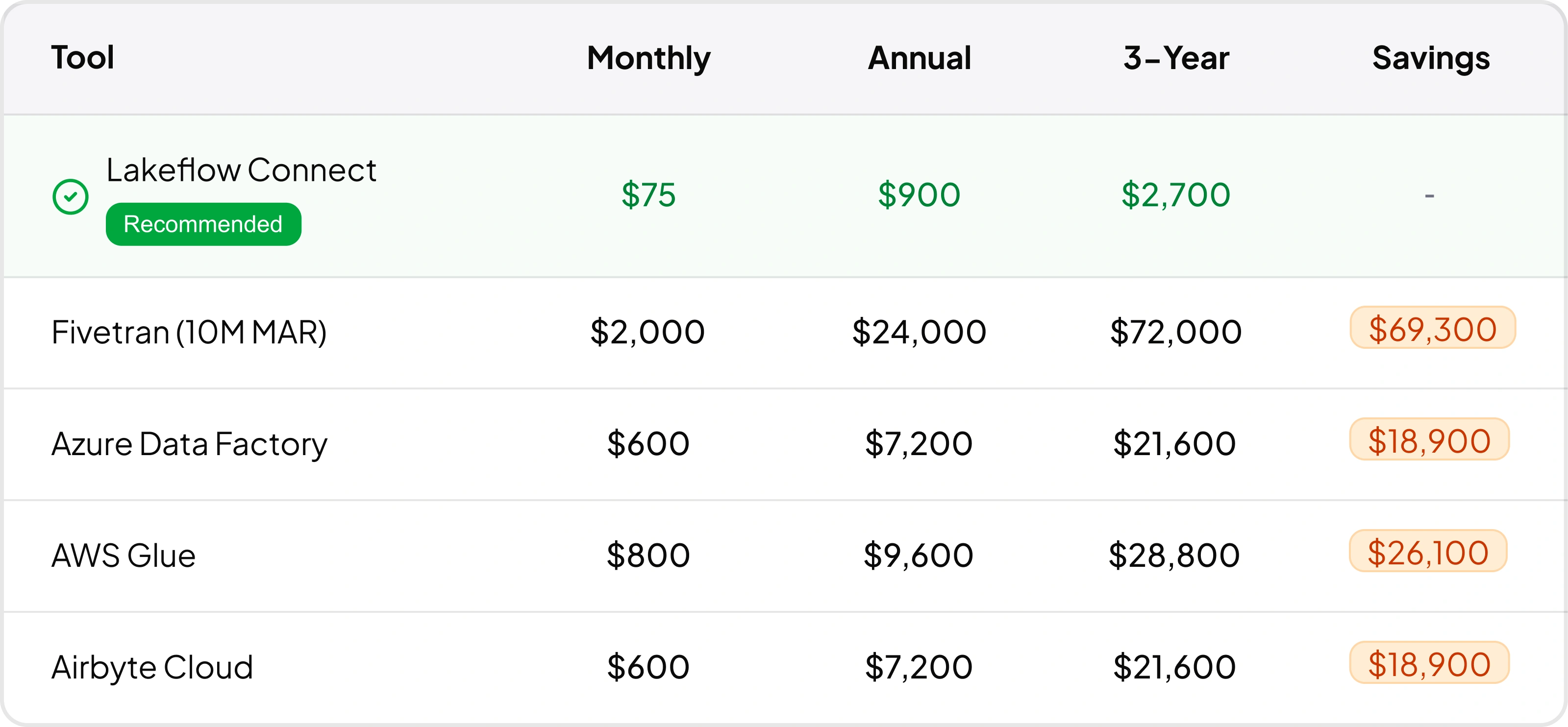
Assumptions: Lakeflow vs. Competitors
Here's how Lakeflow Connect compares to traditional data ingestion tools based on our 50M rows/year scenario:

Why This Approach Works
By consolidating ingestion inside the Databricks platform, Lakeflow Connect directly addresses the challenges highlighted by industry research:
Reduced fragmentation and fewer tools to manage
Better data quality through consistent ingestion patterns
Improved governance, lineage, and observability
Faster availability of data for analytics and AI
Instead of spending time maintaining pipelines, teams can focus on extracting insights and delivering value.
Final Thoughts
Modern analytics and AI initiatives depend on more than advanced models or dashboards; they depend on reliable, timely, well-governed data.
Industry leaders such as the World Economic Forum, Gartner, and Deloitte consistently emphasize that enterprises must strengthen their data foundations before they can scale analytics and AI successfully.
Databricks Lakeflow Connect provides a practical, enterprise-ready path forward, simplifying ingestion while aligning with modern lakehouse architectures.
Ready to Take the Next Step?
If you’re already using Databricks or evaluating it, Lakeflow Connect should be a core part of your ingestion strategy.
Reach out to explore how this approach can be implemented for your data landscape.