



Modernizing a C# Application: From SQL Server to Lakebase and Databricks Apps
8 min read November 23, 2026


Deputy Vice President Data Engineering,
AI & Architecture
Overview
For years, the application ran the old way: a .NET app on a server the team managed themselves, backed by a SQL Server database outside the company's main data platform. That database was licensed and always on, sat outside central governance and audit, and was protected by a password in a configuration file, and its operational data was cut off from the analytical data already on Databricks. Two separate estates to run, pay for and secure. It worked, but it was all friction.
To eliminate this friction, the modernization onto Databricks was carried out in two phases: first the database, then the application. The database moved to Lakebase, Databricks' managed PostgreSQL service; only how the application connects to its data changed, with no change to how it looks or behaves, so users saw no difference. The application itself then moved onto Databricks Apps, signing in through its own service principal that gets a fresh access token every hour instead of a fixed password in a file.
The payoff is one unified platform: the application (Databricks Apps), its operational database (Lakebase) and its analytical data (the Lakehouse) now sit together on Databricks. There is less infrastructure to run and secure, operational data sits beside the analytics rather than in a separate estate, and credentials rotate automatically. The result is a lower cost, better governed and more secure setup, with no disruption to the people who rely on it every day.
Existing Application
The application is an order desk case tracker. Support reps filter, sort and page through customer cases, open a case to change its status or log a response, and pull the next case to work from a rules based queue; a follow up job and a management dashboard round it out. Behind it sits a single schema: about a dozen tables, two views and a function, holding 250,000 cases in the test build, enough for paging behaviour to be real rather than theoretical.
The application reaches SQL Server through the standard System.Data.SqlClient driver. A handful of settings in web.config carry the connection details and tell the data access layer which provider and SQL dialect to use; the whole of the database wiring sits in those few lines.
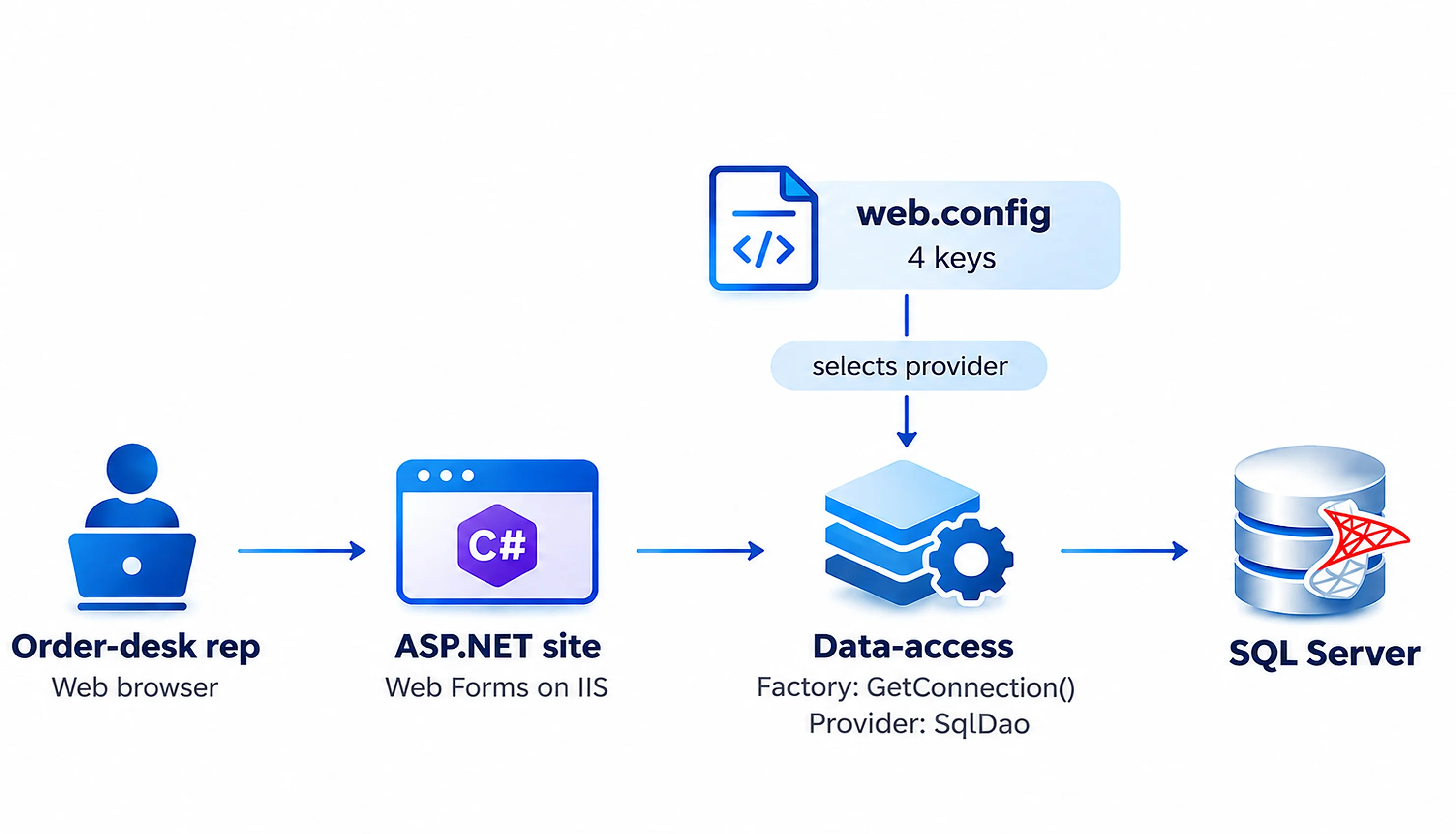
Figure 1. The existing application: a rep's browser, the ASP.NET site on IIS, the data access layer configured through web.config, and SQL Server.
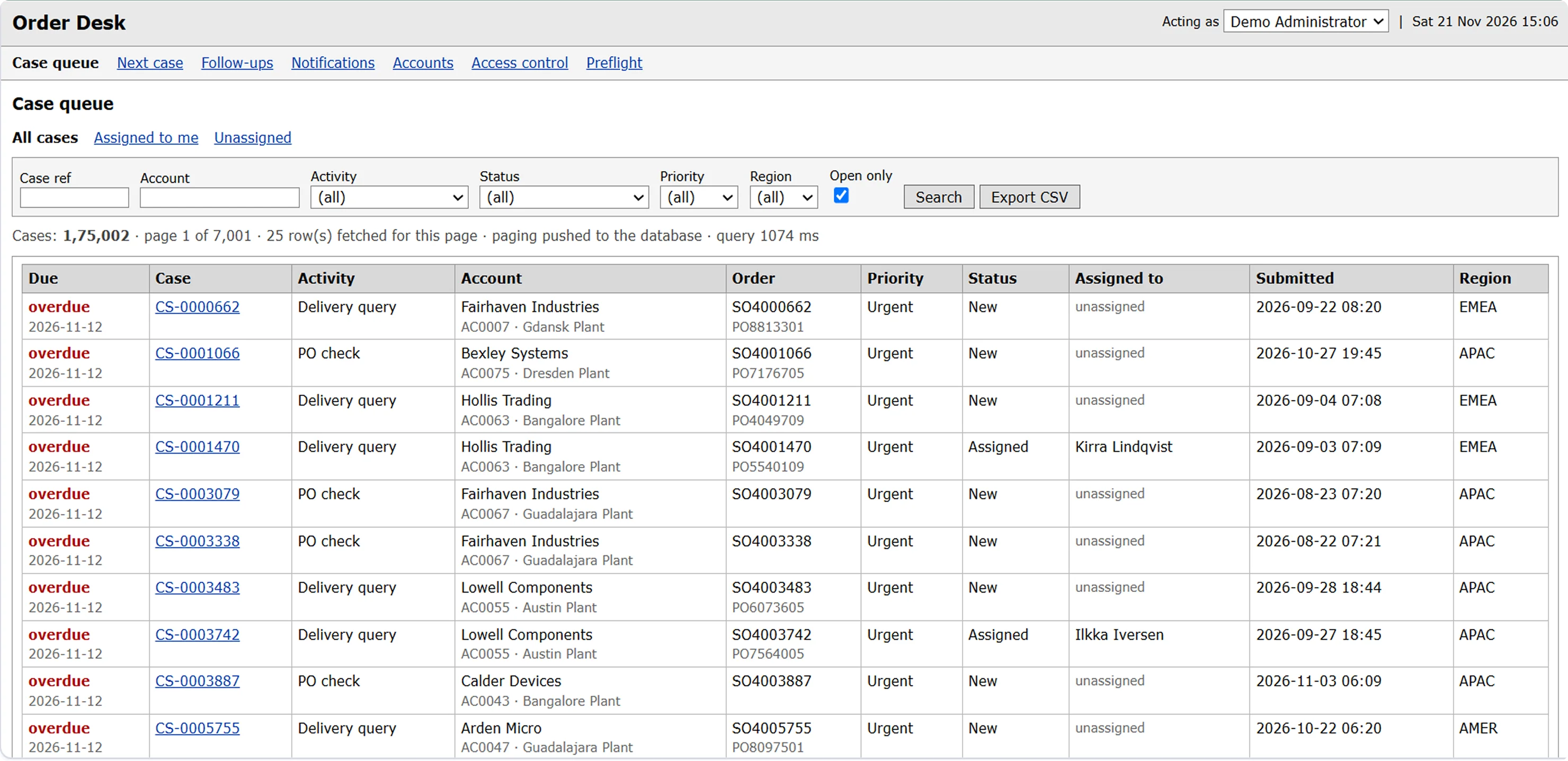
Figure 2. The case queue on SQL Server. The banner identifies the backend.
The Challenge
The application runs on two distinct data workloads. Its historical data was already in the Databricks Lakehouse, but its live OLTP data, constantly inserted and updated as agents work cases, still ran on an on premises SQL Server outside Databricks. That server was licensed and always on, incurring infrastructure and licensing costs regardless of workload activity, and its credentials lived in application config. With analytics already on Databricks, the business wanted its transactional data there too, at right sized cost and with consistent security and governance alongside its analytical data.
Four limitations stood in the way, each one a reason the application could not simply stay where it was:
| Limitation | Impact |
|---|---|
| Data outside the platform | The live transactional data sits outside Databricks, apart from the analytical data already in the Lakehouse. Operations and analytics run on two separate systems, adding data movement and leaving no single governed place for both. |
| Access rules held in the application | Access rules live only in the application, so any client that connects directly to the database (a report, a script, or an ad hoc query) bypasses them, leaving access unenforced at the data layer. |
| Password in web.config | A long lived database password is stored in a configuration file, to be protected and rotated. |
| Self-managed IIS hosting | The team sizes, patches and keeps the web server always on, paid for around the clock. |
Design Decisions and Rationale
3.1 Addressing the Limitations
Each limitation in the previous section is removed by one of the two moves: the database moves to Lakebase, or the runtime moves to Databricks Apps.
| Limitation | How it's addressed |
|---|---|
| Data outside the platform | The database moves to Lakebase, a managed PostgreSQL database integrated with the Databricks platform and accessed through a standard PostgreSQL driver. |
| Access rules held in the application | Database privileges and row level security enforce access at the database level for connected clients, subject to the configured identities and security policies. |
| Password in web.config | On Databricks Apps the app runs as a service principal and uses a short lived OAuth token; no password is stored. |
| Self-managed IIS hosting | The runtime moves to Databricks Apps, a serverless container operated by the platform, next to the data. |
3.2 Sequencing
The migration ran in two independent steps, each verifiable before the next:
Move 1: SQL Server to Lakebase. The database moves first, without changing any application screens; only the data access layer is repointed, so the application can be validated against the new database before anything else moves.
Move 2: C# on IIS to a Databricks App. The runtime moves second. The database schema and business functionality are retained wherever possible, although some SQL queries require compatibility changes; only where the application runs and how it authenticates change.
3.3 What Each Move Required
Each move carried one real cost:
Move 1: cheap, but not free. The real work was making the application's SQL compatible with Lakebase: SQL Server specific syntax has to be reviewed and converted to its PostgreSQL equivalent. Because every screen and background job goes through one provider layer, that conversion is done once in the shared layer and inherited everywhere.
Move 2: the front end is rebuilt, not ported. ASP.NET Web Forms cannot run directly as a Databricks App, so the front end was rebuilt using Flask. The database contract carried over where compatible, along with the existing business functionality; the cost was a new front end to build and test.
Target Architecture
The target architecture is reached through two migration stages, each producing a stable and independently verifiable system. The first keeps the existing application runtime in place while moving the database to Lakebase. The second moves the application runtime to Databricks Apps, completing the migration.
4.1 Architecture with the Database on Lakebase
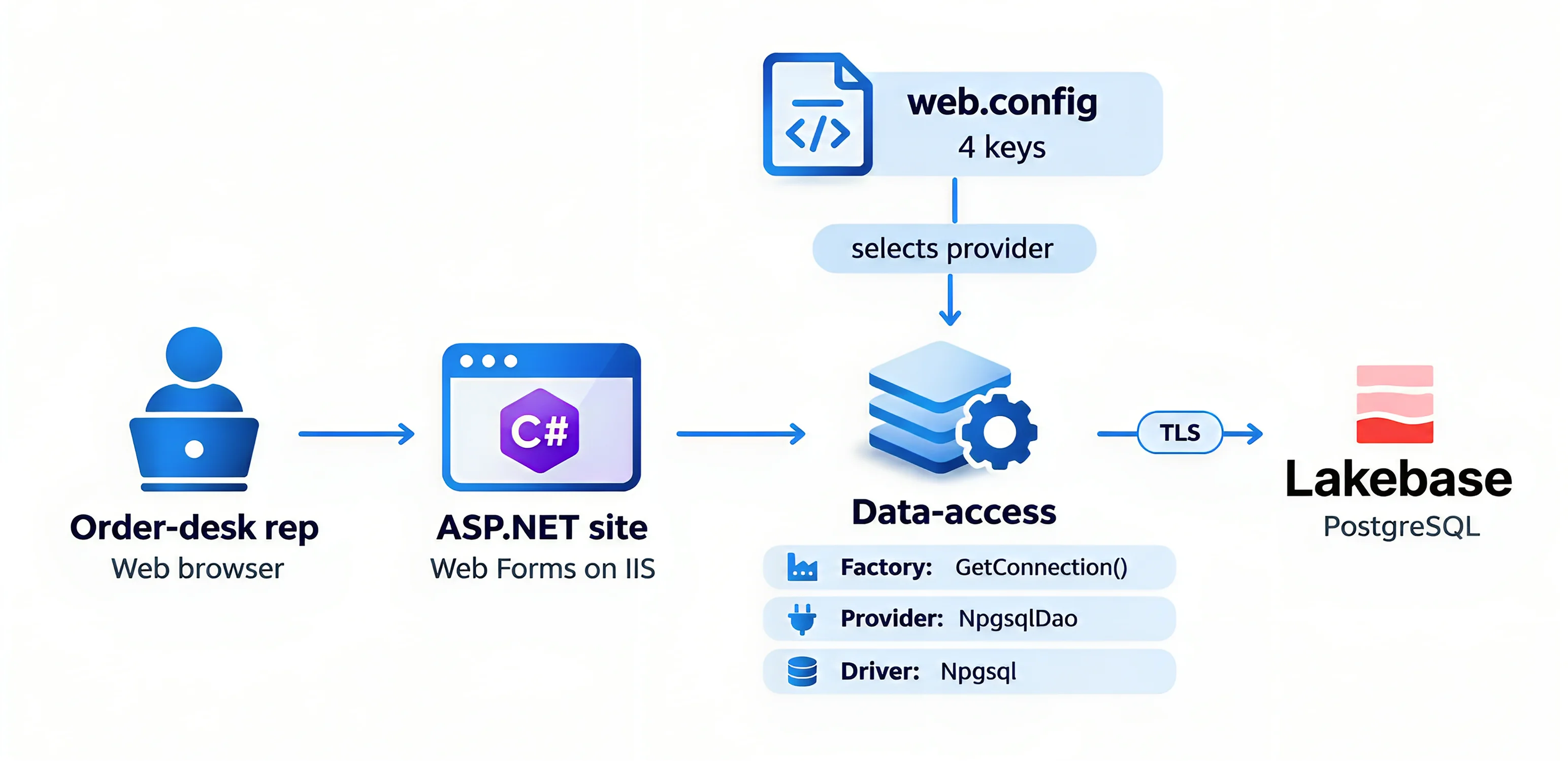
Figure 3. The application after the database move: the same site and data access layer, configured for Lakebase.
| Component | Role |
|---|---|
| ASP.NET site on IIS | Serves all application screens. Existing pages and markup remain unchanged. |
| Data-access layer | The provider factory resolves NpgsqlDao, which implements the same data access contract as the previous SQL Server provider. |
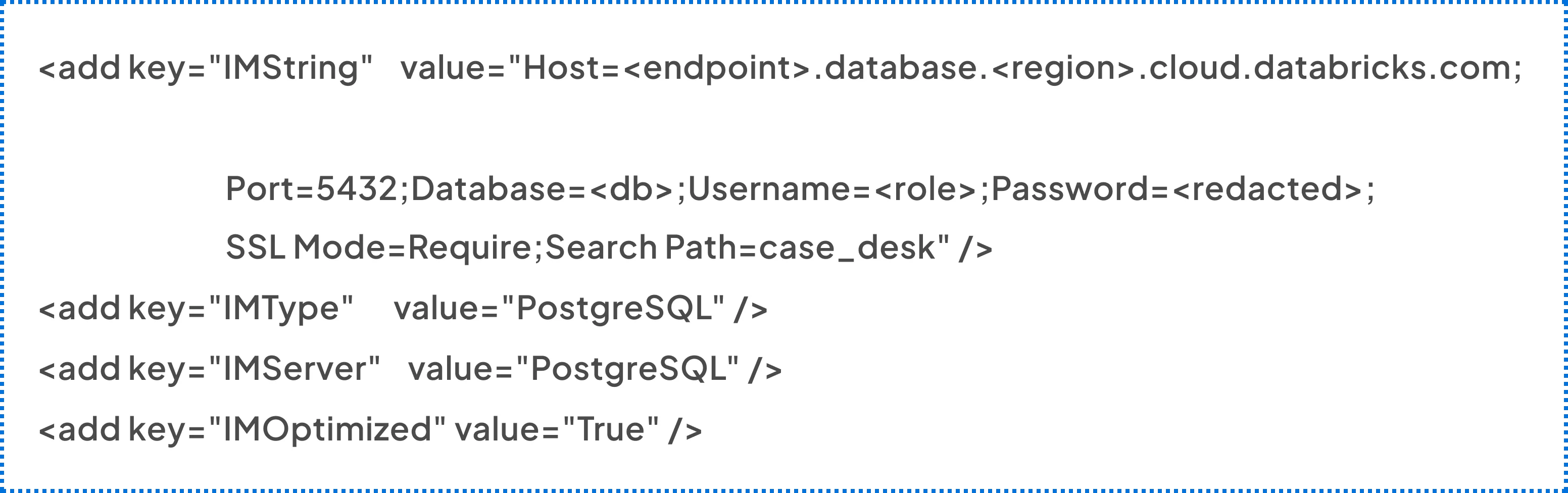
| web.config | Four configuration settings select the PostgreSQL provider and dialect and supply the Lakebase connection configuration. |
| Lakebase | Hosts the case_desk schema, queue and follow up views, and configured database roles, grants, and row level security policies. |
The runtime and the credential model are unchanged. The next architecture changes both.
4.2 Architecture with the Application on Databricks Apps
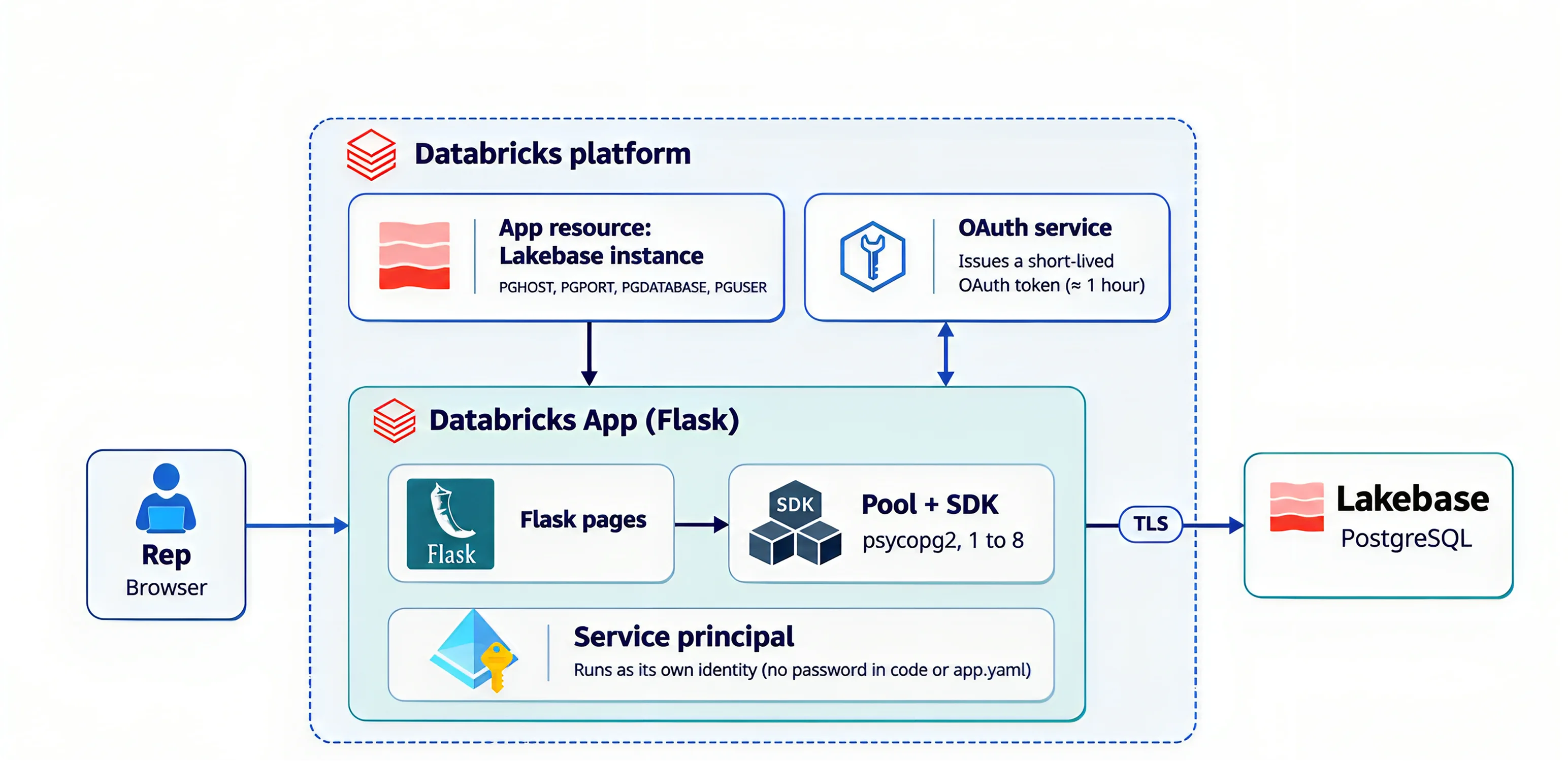
Figure 4. The end state: a Databricks App obtains its address and identity from the platform and connects to Lakebase.
| Component | Role |
|---|---|
| Databricks App (Flask) | A managed application runtime hosting the rebuilt screens. The application uses its dedicated service principal identity for platform authentication. |
| Connection pool | Maintains reusable psycopg2 database connections between requests. The pool is recreated or refreshed as required when OAuth credentials are renewed. |
| Attached Lakebase resource | Provides the Lakebase connection configuration, including PGHOST, PGPORT, PGDATABASE, and PGUSER, to the application environment. |
| Databricks SDK | Obtains short lived OAuth credentials for the application's service principal to authenticate with Lakebase. |
| Lakebase | Hosts the same case_desk schema, views, database grants, and row level security policies introduced in the previous migration stage. |
4.3 Comparison of the Three Architectures
| Aspect | C# on SQL Server | C# on Lakebase | Databricks App on Lakebase |
|---|---|---|---|
| Runtime | ASP.NET on IIS | ASP.NET on IIS | Flask in a serverless container |
| Hosting | Server managed by the team | Server managed by the team | Operated by the platform |
| Driver | System.Data.SqlClient | Npgsql | psycopg2 |
| Identity | Database login | Database role | Service principal |
| Secret at rest | Password in web.config | Password in web.config | None (token issued on demand) |
| Access control | Application login | Grants and row-level security | Grants and row-level security |
| Data location | Outside the platform | Inside the platform | Inside the platform |
Implementation
The migration follows the sequence shown in Figure 5. First, the database moves from SQL Server to Lakebase while the existing application screens remain unchanged. Once the database migration is validated, the application runtime moves to Databricks Apps, connecting to the same Lakebase schema.
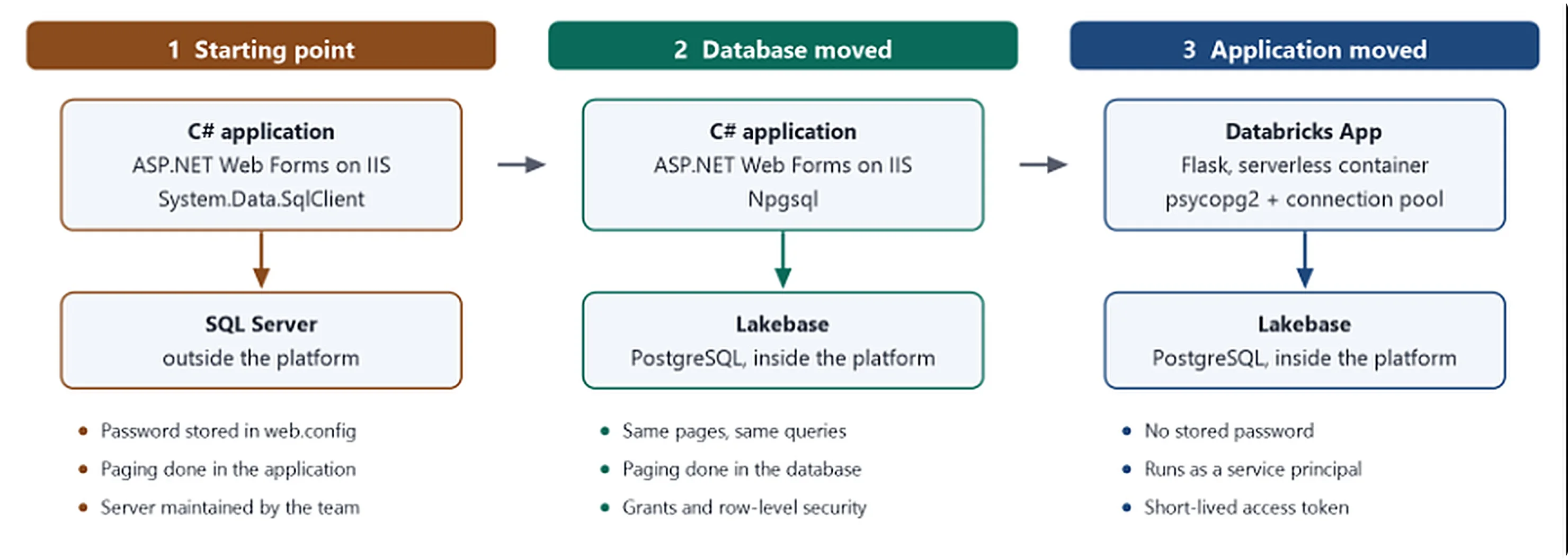
Figure 5. The migration path: the original C# application on SQL Server, the same application on Lakebase, and the rebuilt application on Databricks Apps with Lakebase.
5.1 Repointing the Data Layer to Lakebase
The application uses a provider based data access pattern: an abstract class defines the database operations required by the application, while a concrete provider implements those operations for each database backend. Since application screens do not directly reference database drivers, switching to Lakebase required implementing the existing contract through a PostgreSQL provider. This involved three focused changes in the data access layer:
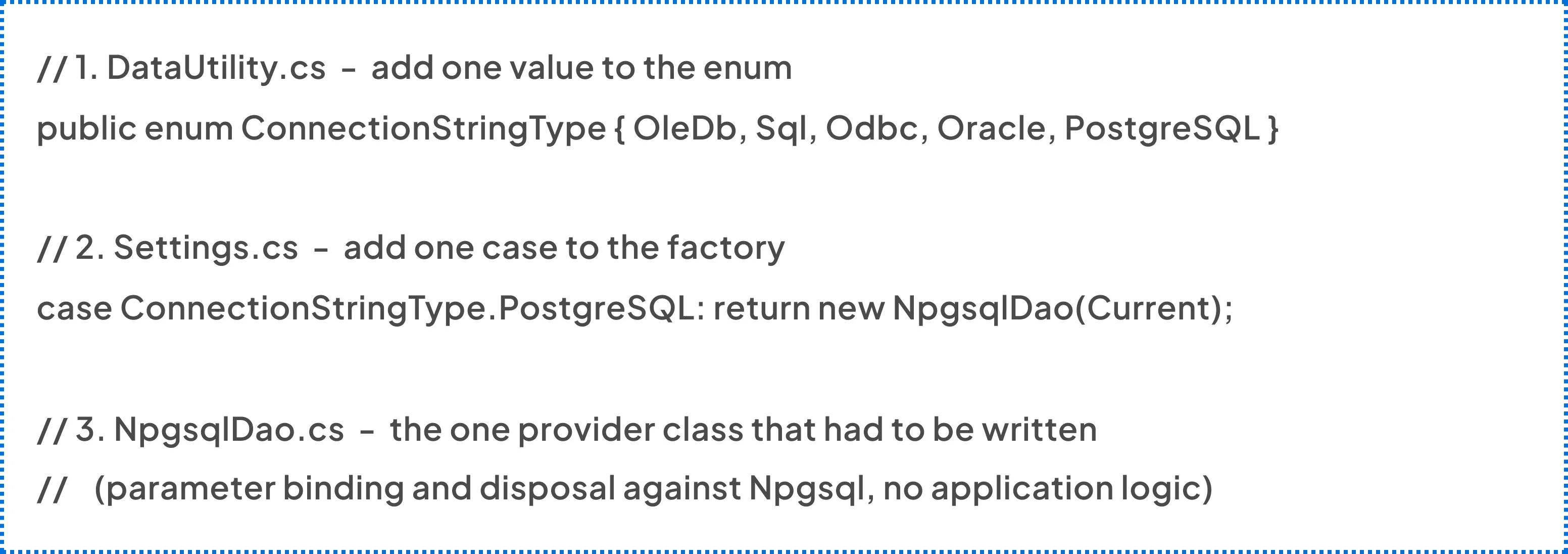
This covers every database access path because all screens and background jobs use the shared provider. The same four web.config settings now configure the PostgreSQL provider and point the application to Lakebase:
5.2 SQL Dialect Differences
Because Lakebase is PostgreSQL, any SQL written for SQL Server must be adapted for PostgreSQL compatibility before it runs. These adjustments are made once in the shared data access layer, so every screen and background job inherits them without being changed, and the screens behave exactly as before.
To make that conversion, the application's SQL Server queries were translated to their PostgreSQL equivalents using Databricks Genie, then validated on Lakebase.
Genie: Databricks' AI assisted tool for working with SQL. It sped up converting the queries from SQL Server to PostgreSQL, so the dialect changes were applied quickly and consistently rather than rewritten by hand.
5.3 Access Control Enforced by the Database
Because Lakebase uses PostgreSQL, database privileges and row level security (RLS) can enforce access restrictions independently of application level checks. In this example, a reporting role is restricted to read only access, while a region scoped role can access only cases belonging to its permitted region.
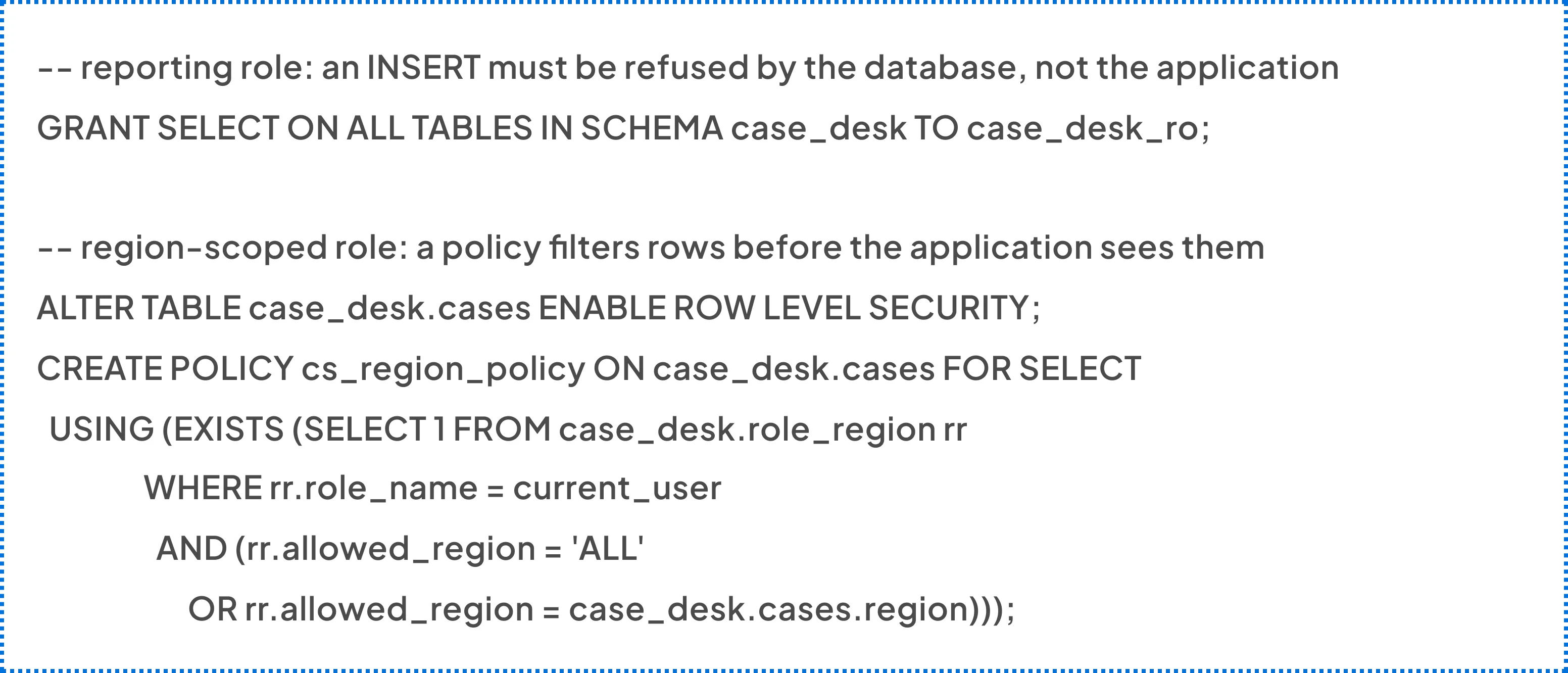
Run as each of the three roles, the Access Control screen confirms the policy at runtime: the reporting role's INSERT is refused by the grant, and the region scoped role sees fewer rows under the policy, with no permission check in application code (Figure 6).
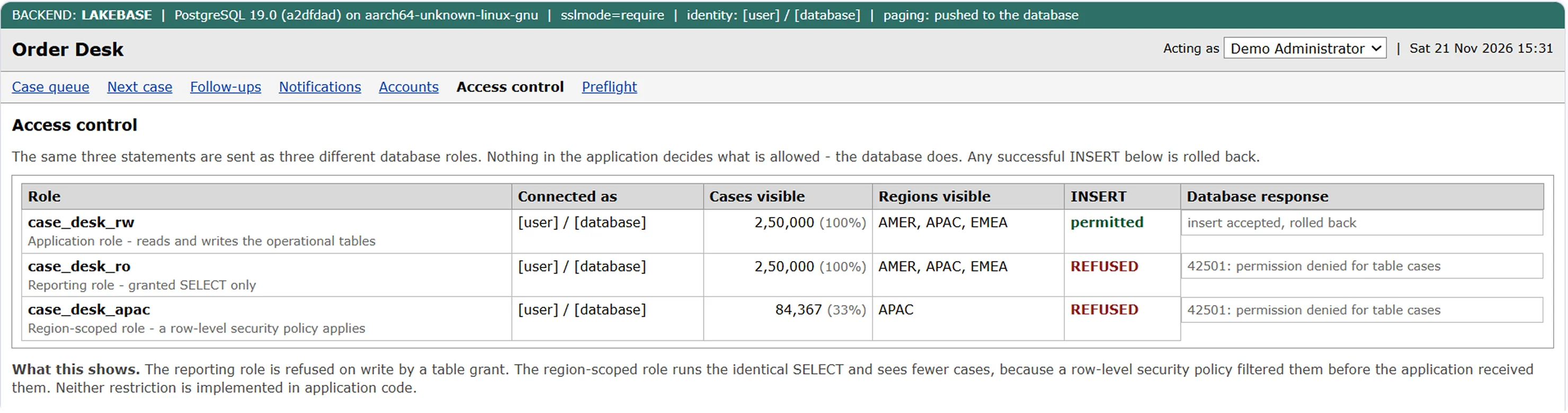
Figure 6. The Access Control role shown on the application.
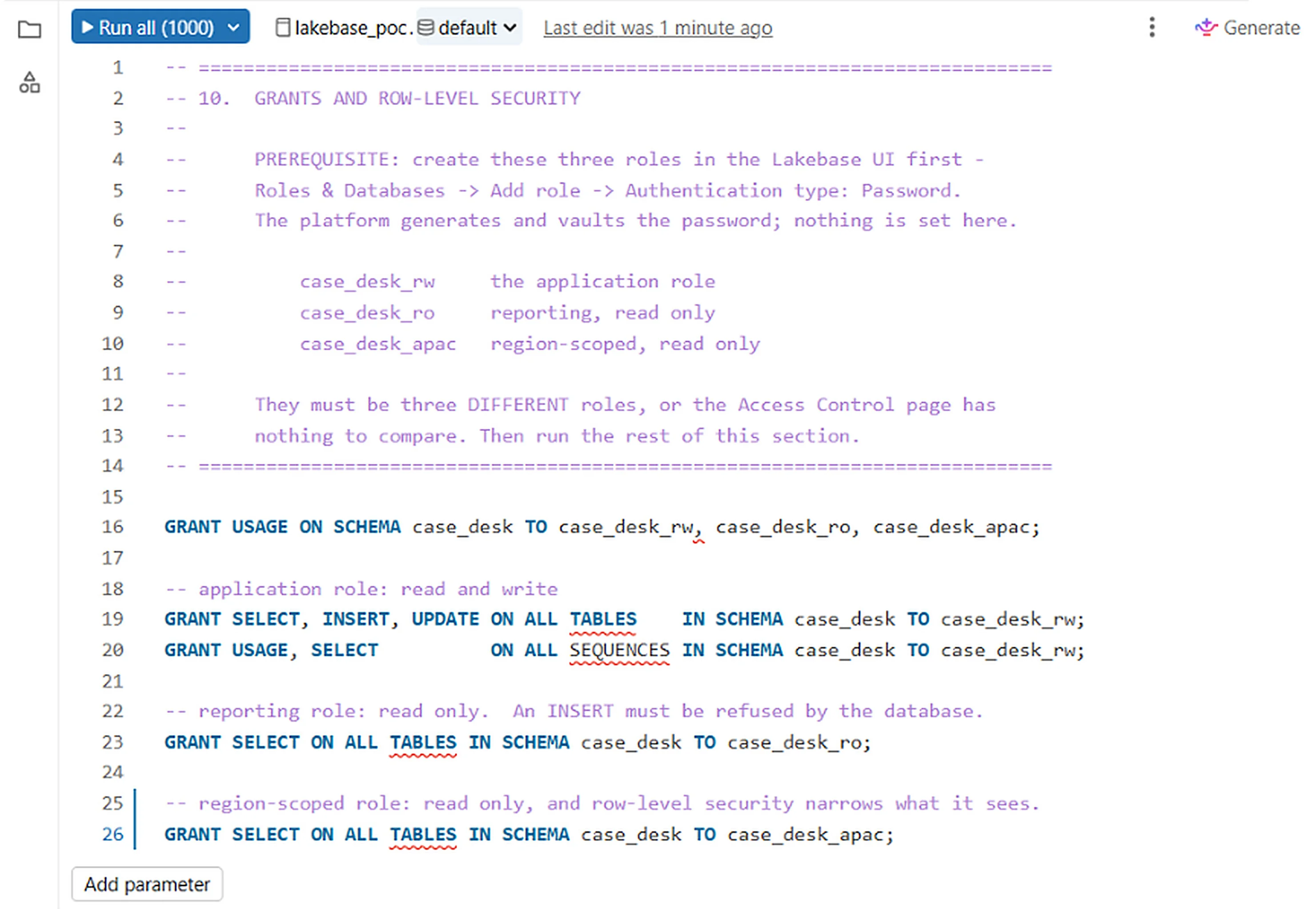
Figure 6.1. The Access Control screen, each set of statements run as its database role.
The rule is held by the database, so it applies to every client that connects (a notebook, a reporting tool or a command line client), not only this application. With the database on Lakebase and its behaviour checked, the application still runs on IIS with a stored password; the next change addresses the runtime.
5.4 Application Runtime on Databricks Apps
A Databricks App cannot host ASP.NET Web Forms, so the front end is rebuilt on Flask. The database contract is unchanged: the same queries, with psycopg2 in place of Npgsql. Attaching the Lakebase instance to the app injects the connection details (host, port, database and user) as environment variables, so the app reads them from the Databricks environment rather than from a config file.
A Preflight page, opened first after every deployment, verifies the wiring before the app is trusted: it confirms psycopg2 connected to PostgreSQL over a TLS connection, with every value taken from the injected variables and nothing typed into the app (Figure 7).
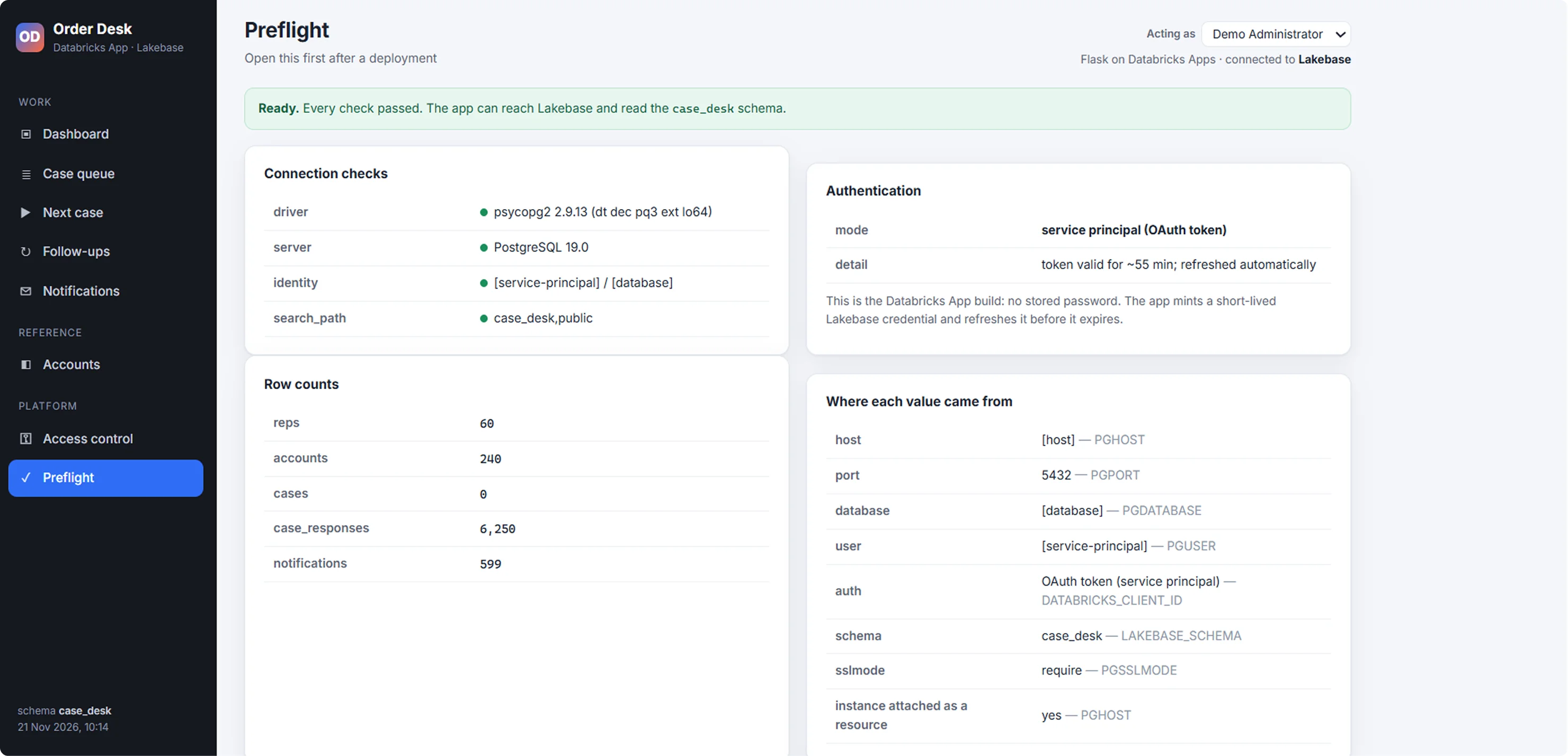
Figure 7. The Preflight page: driver, server version, connected identity, authentication mode and row counts.
5.5 Workload Identity and Short Lived Credentials
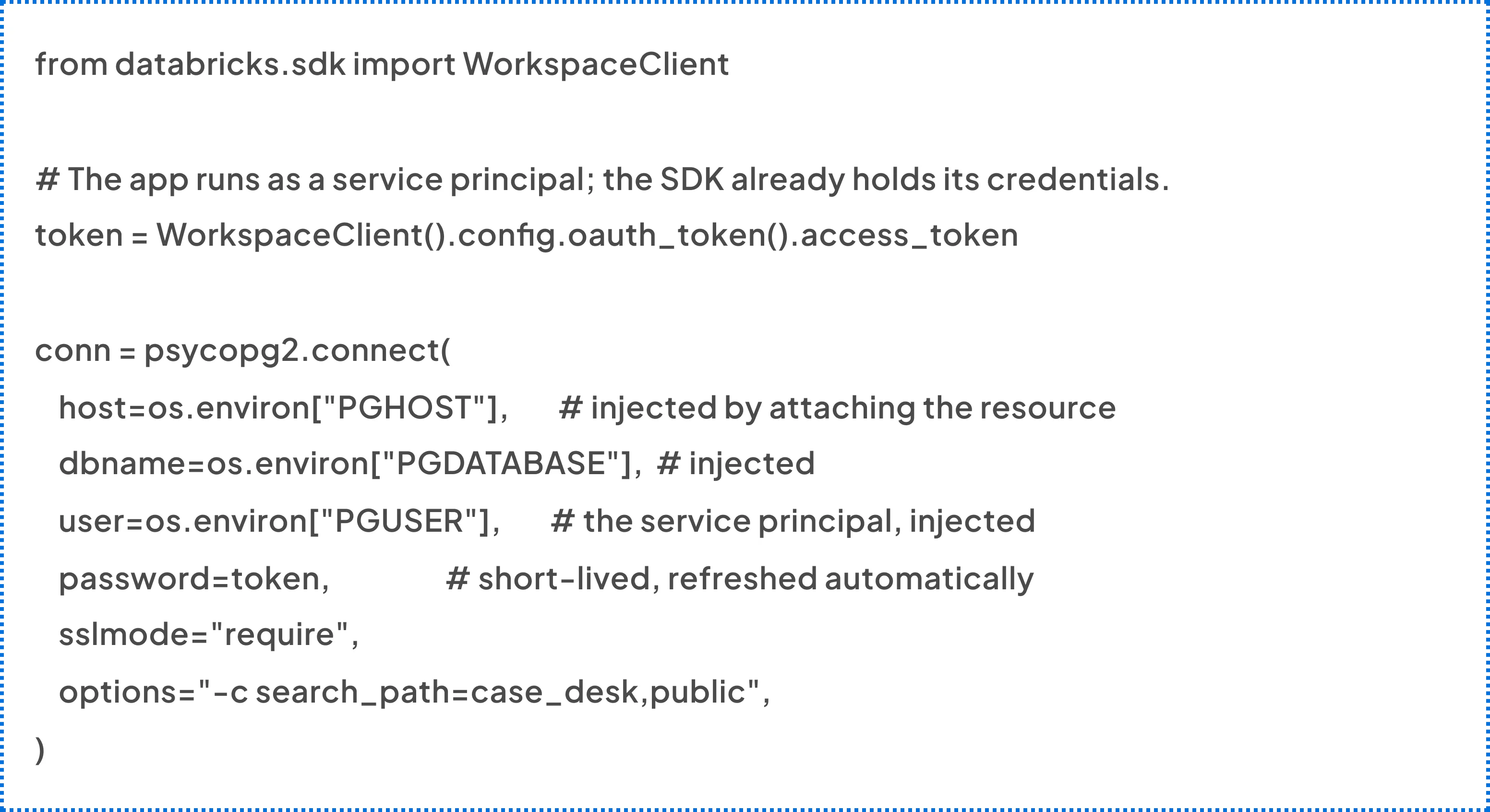
The C# build authenticated as a database role with a password held in web.config. The Databricks App holds no password: it runs as its own service principal (SPN). At connection time it asks the Databricks SDK for a short lived OAuth token and presents that token as the PostgreSQL password; the token is refreshed automatically, so nothing is stored at rest.
Validation and Results
6.1 Test Approach
Verification uses the generated order desk dataset of 250,000 cases, so the results show structural equivalence, not production measurements. The Preflight page confirms the Databricks App is wired correctly: psycopg2 connected to PostgreSQL over TLS, with every value taken from the injected variables.
6.2 Same Results on Both Databases
Run with the same filter against SQL Server and against Lakebase, the case queue returns the same records and the same number of pages. Access control is verified separately against each database role (5.3).
6.3 Behaviour on Databricks Apps
The dashboard aggregates the same data inside Lakebase and serves it from the serverless container, reporting 175,002 open cases, the same figure the case queue returns, with the due/SLA state derived in the database view, not computed in Python (Figure 8).
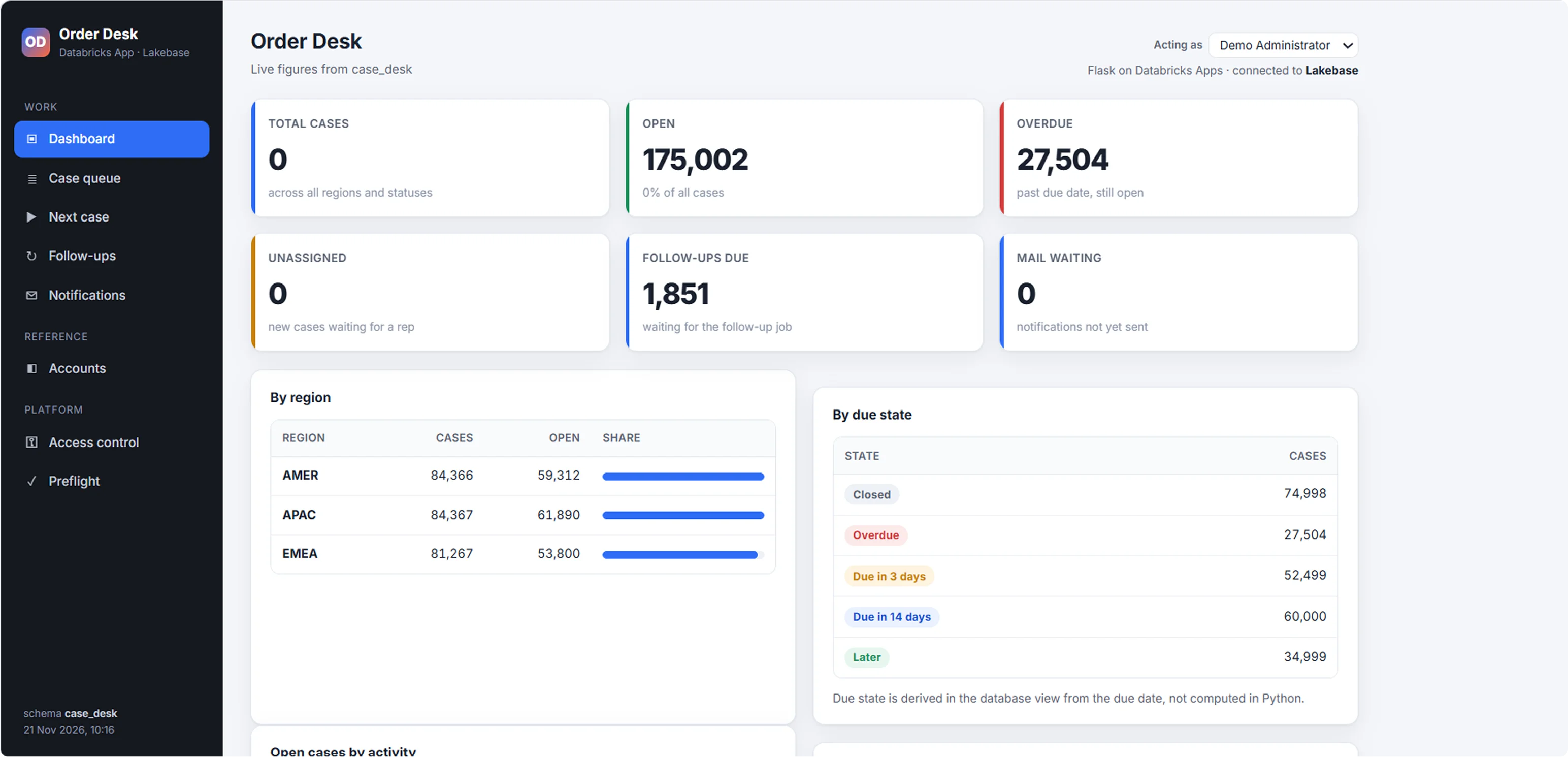
Figure 8. The Databricks App dashboard: totals, regional and due state breakdowns, and the cases that need attention.
Outcomes
| Outcome | What the customer gains | Basis |
|---|---|---|
| Cost reduction | Removes the separately hosted database and the IIS server that the team provisions, patches, and operates. Lakebase Autoscaling and Databricks Apps provide managed, elastic capacity in place of fixed, always on infrastructure. | Architectural improvement; actual savings depend on the customer's existing infrastructure costs and usage. No cost figures were measured. |
| Lower maintainer overhead | No self managed web server to patch, no static database password to maintain and rotate, and fewer infrastructure components to operate. | Delivered through the migration architecture. |
| Resource availability | Managed application hosting and elastic database capacity reduce manual server sizing and infrastructure management, letting the team focus on application functionality and data workflows. | Based on Lakebase Autoscaling and Databricks Apps capabilities. |
| Performance and data transfer | Paging moves into the database: each page request returns 25 rows instead of transferring the full 175,002 row result set to the application, reducing data transfer and application side memory for paged requests. | Validated through the implementation on 250,000 test cases. Response latency was not benchmarked. |
| Built in connection pooling | Lakebase pools and reuses database connections at the platform level, so the application serves many concurrent users without exhausting PostgreSQL's connection limit and without a separately managed pooler to run or size. | Based on Lakebase (managed PostgreSQL) capabilities. |
| Reduced credential exposure | The application no longer stores a long lived database password. New connections use short lived OAuth database credentials, TLS encrypts database communication, and database grants and row level security enforce access policies. | Implemented and validated in the migration. |
Conclusion
This migration brought the application, its live data, and its analytical data together on a single Databricks platform. The database was moved from SQL Server to Lakebase with minimal changes to the existing application, while the application itself was rebuilt on Databricks Apps. This eliminated the need to manage separate servers and store database passwords.
The result is a simpler, more secure, and easier to manage environment, where business operations and analytics work side by side. Most importantly, the migration was completed step by step, preserving the application's existing functionality and ensuring users could continue their work without disruption.
Our next blog applies the same approach to a Perl application on MySQL, where the database is reached through a central connection registry.