





The Two-Workload Problem
For years, building an application meant running two workloads that had almost nothing to do with each other.
On one side was the operational database - SQL Server, MySQL, Oracle or PostgreSQL. This is where the application lived. A user opens a record, changes a field, saves. The database returns a single row in a few milliseconds and accepts the write immediately. Everything the business was actually doing that day was there.
On the other side was the analytical platform - the lakehouse. Delta tables, a SQL warehouse, dashboards, reports, and increasingly the models. This is where the same data went to be understood: joined with history, aggregated, scanned across years.
Between them sat a pipeline. Every night, or every hour, a job copied data out of the operational database into the lakehouse. Often a second job copied results back the other way, so the application could show a figure the lakehouse had calculated.
So the same data existed in two places, in two formats, on two schedules. Nobody designed that on purpose. It was simply the only way to get low-latency writes and large-scale analytics at the same time.
It also charged rent every month:
Duplication
The same table maintained twice, drifting apart as one side changes and the other does not.
A pipeline to own
Somebody builds it, monitors it, and gets called when it fails at three in the morning.
Data that is always behind
What the application shows is as old as the last successful run.
Two workload estates
To patch, size, back up, secure and pay for.
Paying for peak around the clock
Because a traditional database is sized for its busiest hour and costs the same when it is idle.
The Governance Gap
That is the part which gets the least attention and caused us the most trouble.
The lakehouse side had governance. Unity Catalog knew who each user was, what they were allowed to read, which columns were masked, and where every table had come from. If somebody asked who could see a piece of data, there was one place to look and one answer.
The operational database had none of that. It sat outside the platform entirely, and it showed:
Its own identities
Database logins with no relationship to the company directory or the workspace.
Its own permissions
Grants held inside the database, maintained by hand, and reviewed rarely.
Lineage that stopped at the boundary
You could trace a Delta table back to the pipeline that filled it, and no further.
Two audit trails
one in the platform and one in the database, neither of them complete on its own.
Credentials in files
Because the application had no platform identity to use, its username and password ended up in a configuration file on the web server - frequently in source control, usually shared between people, and almost never rotated.
Put plainly: the freshest and most sensitive data in the company - live customer records, live transactions - sat in the least governed system. The copy downstream of it was the one with the policies attached.
That was the position the industry was in. The lakehouse solved analytics properly, but it never replaced the transactional database - so the split, the pipeline and the governance gap all stayed. Until Lakebase.
How Lakebase Closes the Gap
Lakebase closes the gap rather than bridging it. Instead of the application keeping its database somewhere else, the operational database moves inside Databricks - next to the lakehouse data, and under the same governance.

Figure 1. The operational database as an object inside the platform. It is listed, created and managed in the workspace alongside everything else, rather than being a separate estate reached across an integration boundary.
Taking the problems above in order:
One platform, not two estates
Databricks manages the database. There is no separate server to patch or size.
No pipeline to build
You don't need to build and maintain your own synchronization pipeline. Databricks provides a managed sync pipeline for moving supported lakehouse data into Lakebase.
Fresher data
That synchronisation runs once, on a trigger, or continuously, so you choose how current the figure has to be.
One definition of the table
A managed synchronized copy of the lakehouse table is maintained in Lakebase, reducing the need for custom replication pipelines.
One identity model
Databricks users, groups and service principals can authenticate to the database directly, so an application can have an identity instead of a password in a file.
One place to grant and review access
shared with the rest of the platform.
Compute separated from storage
Capacity follows demand and idle compute
Copies in seconds
A branch or clone of the database is a fast operation rather than a restore measured in hours.
And the detail that decides whether any of this is usable on a system that already exists: the application does not have to be rewritten. Lakebase is PostgreSQL, so anything that can already speak to Postgres can speak to Lakebase with the driver it already has.
What Lakebase Is?
Lakebase is a fully managed PostgreSQL database that runs inside the Databricks platform. That sentence is short, and almost everything useful follows from it.
It is genuinely Postgres. It speaks the PostgreSQL wire protocol, which means the driver your application already uses to talk to Postgres connects to Lakebase without modification. There is no Databricks SDK in the data path, no proprietary client library, and no new dialect to learn. An application connects to a host on port 5432, authenticates, and issues SQL. From the application's point of view it is talking to a Postgres server - because it is.
What makes it more than hosted Postgres is where it sits. Underneath, compute is separated from storage: data lives durably on cloud object storage while the database compute runs independently and elastically. Around it, the database is part of the same platform as your lakehouse data - Lakebase integrates with Databricks identities and Unity Catalog, allowing operational data to participate in the broader Databricks governance model while retaining PostgreSQL-native access controls.
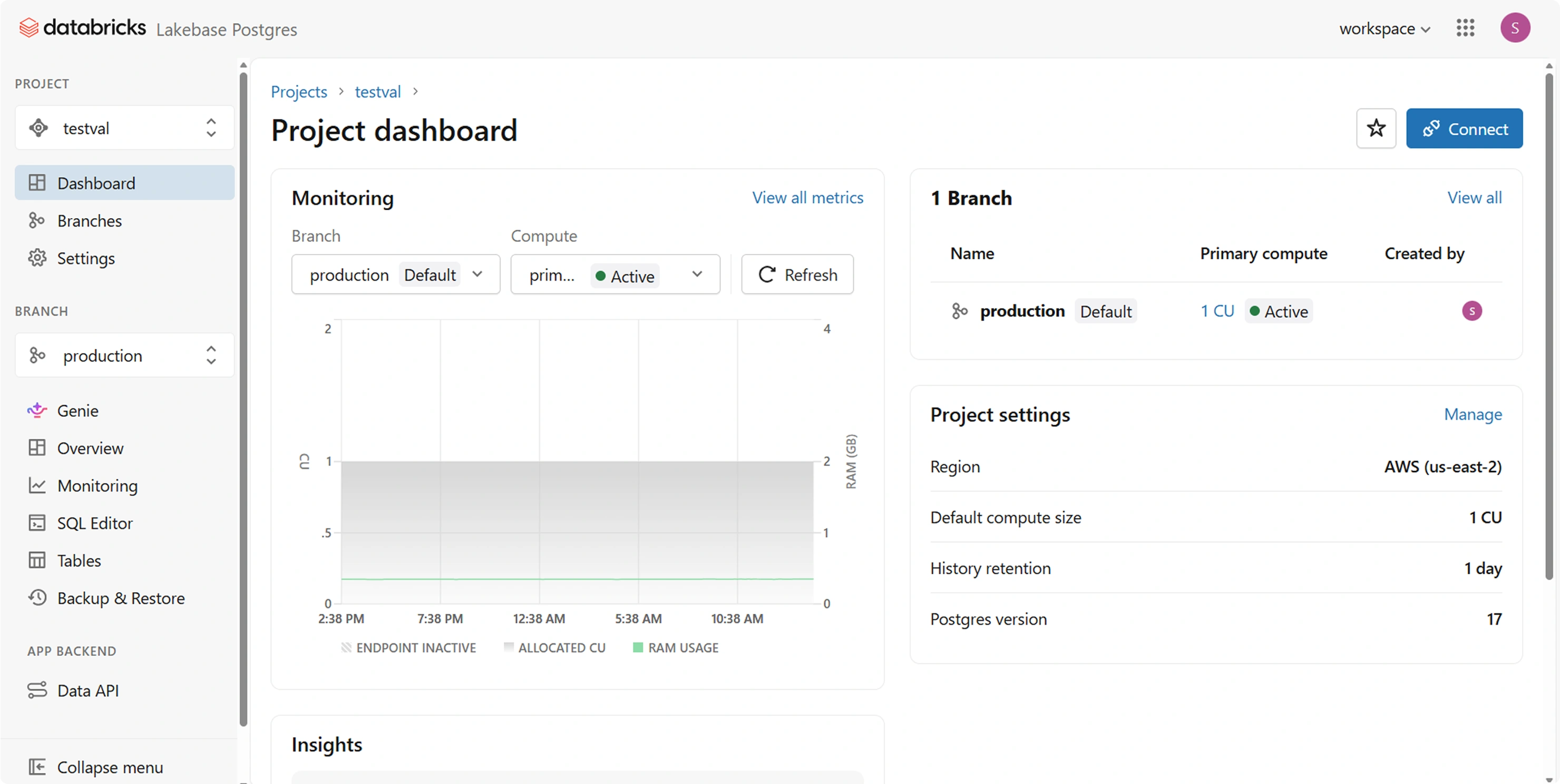
Figure 2. The same database up close. Compute and storage are reported separately, and the database has branches - so a working copy for development is created rather than restored.
The shortest useful definition: Lakebase is the transactional database that lives where your analytical data already is.
The rest of this part is the detail - where Lakebase fits beside what you already run, what its features are, how you connect to it, and which of those features actually earned their keep when the work was real. One number for scale before that: across five production applications, the largest single migration touched 94 files and changed 129 lines. Every one of those lines was the same edit.
Where Lakebase Fits in the Platform
A question most readers form early, and worth answering plainly: Lakebase does not replace the parts of the platform you already use.
| Component | Role |
|---|---|
| Lakebase | Transactional and operational data - the database an application talks to |
| Delta / lakehouse | Analytical and historical data, at volume |
| SQL Warehouse | The analytical query engine - unchanged, and not replaced |
| Unity Catalog | One identity and permission model across both sides |
Lakebase also synchronises with lakehouse tables directly, which removes the external pipeline from the picture. How fresh that data needs to be is configurable:
| Mode | Behaviour | Use when |
|---|---|---|
| Snapshot | Full copy on every run, replaced atomically | High-churn data, or a source without Change Data Feed |
| Triggered | Refreshes when you run it | Incremental changes on a schedule you control (needs Change Data Feed) |
| Continuous | Continuously propagates supported source changes to Lakebase | Typically with seconds of latency. |
These are complementary planes in one platform rather than competing products. The operational store sits beside the analytical one instead of across an integration boundary from it.
Lakebase Compared with Managed PostgreSQL
If it is just Postgres, the obvious question is why not use Azure Database for PostgreSQL, or Amazon RDS. It is a fair question and it deserves a straight answer.
• Governance in one plane
Identity, permissions and auditing are shared with the rest of the platform rather than being a second estate to manage.
• Proximity
The transactional store sits next to the analytical one, so synchronising between them is a platform feature rather than a pipeline you build.
• Operational surface
One platform, one networking model, one set of credentials, one support relationship.
Core Features
Pulling the above together, along with the capabilities that matter day to day:
| Feature | What it gives you |
|---|---|
| PostgreSQL compatibility | Standard PostgreSQL drivers, SQL and supported PostgreSQL features/extensions can be used. |
| Serverless elastic compute | Capacity follows demand instead of being sized for peak |
| Scale to zero | Compute can automatically suspend after a configurable period of inactivity, reducing compute costs during idle periods. |
| Separated durable storage | Storage scales independently from compute |
| Branching and instant clones | A working copy of the database in seconds, not hours |
| Point-in-time recovery | Roll back to a moment rather than to last night's backup |
| Lakehouse synchronisation | Snapshot, triggered or continuous - no external pipeline |
| Roles and row-level security | Standard Postgres access control, enforced by the database |
| Extension support | Including pgvector, for embedding and search workloads |
| Standard PostgreSQL tooling | psql, pg_dump and the usual clients work, so moving data out is a standard operation |
Every introduction to Lakebase publishes a list like this one. What almost none of them tell you is which entries earn their keep once you are doing real work - so that is the next section.
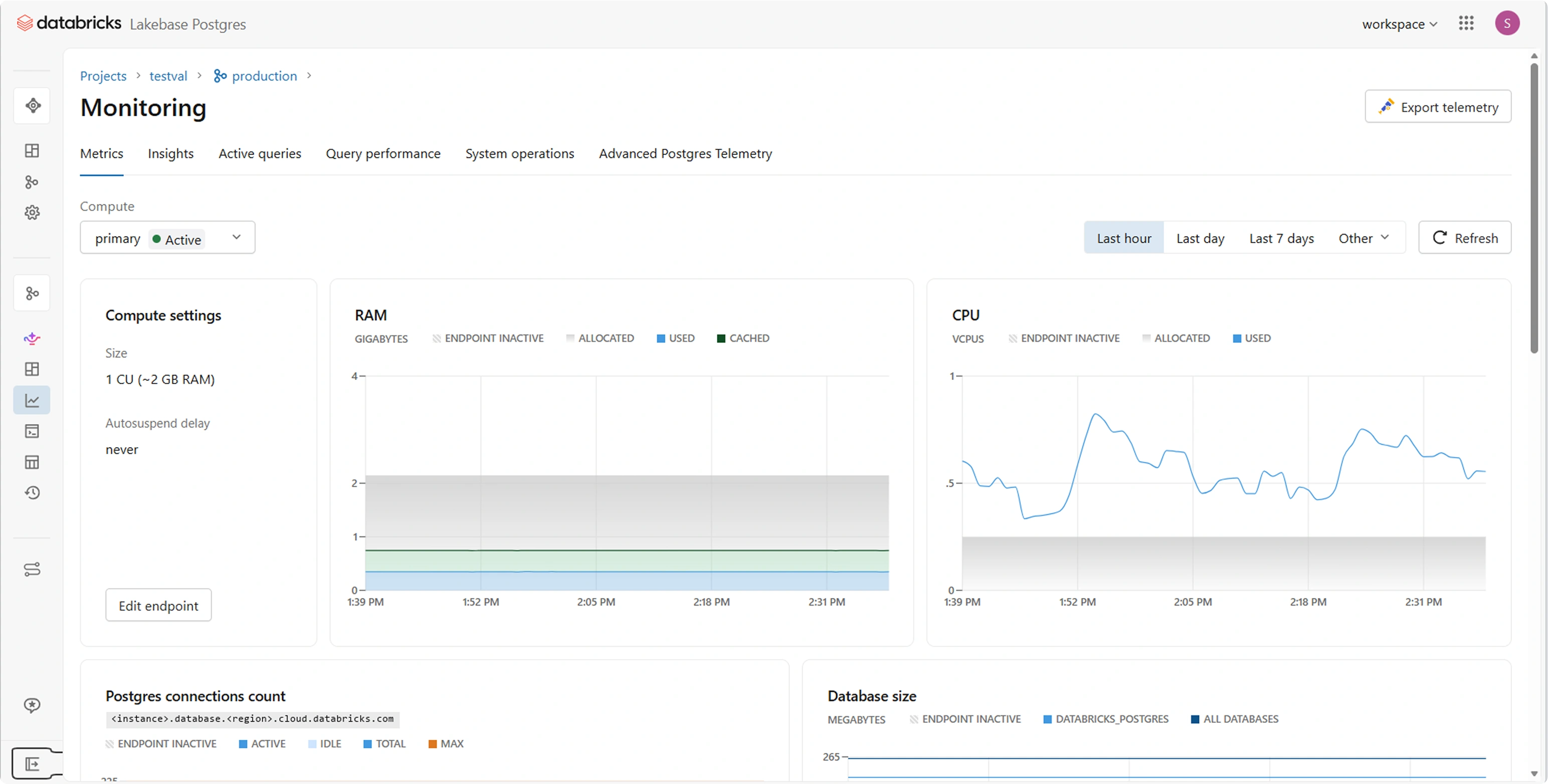
Figure 3. Several of the features above on one screen: the compute size, the autosuspend setting that governs whether idle compute scales to nothing, and ordinary PostgreSQL telemetry - connection counts, database size, deadlocks and row activity. Autosuspend is set to never on this database, so it does not scale to zero; that is a setting rather than a property of the service.
The Features That Mattered in Practice
Across the five migrations, four features did the work:
• PostgreSQL compatibility
This is the one that made everything else possible. Existing drivers connected unchanged, existing SQL knowledge transferred, and migration became a connectivity exercise rather than a rewrite.
• Lakehouse synchronisation
Reference data now arrives in the operational database from the lakehouse without an external pipeline to build and monitor.
• Native Postgres roles with passwords
Applications that read their credentials from a configuration file at startup could connect with no code change at all.
• Serverless compute and scale to zero
Capacity follows demand rather than being provisioned for the worst hour of the month, and idle compute costs nothing.
Connecting to Lakebase
An application needs five things: a host, port 5432, a database name, credentials, and SSL enabled. Encryption is not optional, so plan for it rather than discovering it.
Whatever your application is written in, it connects with that language's standard Postgres driver:
| Stack | Driver | Connection form |
|---|---|---|
| Perl | DBD::Pg | dbi:Pg:host=...;port=5432;dbname=...;sslmode=require |
| Perl / ODBC | psqlODBC | DRIVER={PostgreSQL Unicode(x64)};SERVER=...;SSLmode=require |
| .NET | Npgsql | Host=...;Port=5432;Database=...;SSL Mode=Require |
| Python | psycopg2 / psycopg3 | postgresql://host:5432/db?sslmode=require |
| Java | PostgreSQL JDBC | jdbc:postgresql://host:5432/db?sslmode=require |
That table is the whole compatibility argument in practice. Three of those drivers were used across the five applications, none of them written with Databricks in mind, and none of them needed changing.
One setting worth knowing before you start: the search path. If your queries reference tables without schema-qualifying them, setting the search path in the connection string lets those names resolve to the schema you migrated into - so the queries themselves never change. On a large legacy codebase this single setting removes an enormous amount of mechanical editing.
Host=<instance>.database.<region>.cloud.databricks.com;Port=5432;
Database=<database>;Username=<role>;Password=<password>;
SSL Mode=Require;Search Path=<schema>
Authentication Options
This is the decision that interacts most with how your application is built, and the platform's own defaults tell you which method it considers the norm.
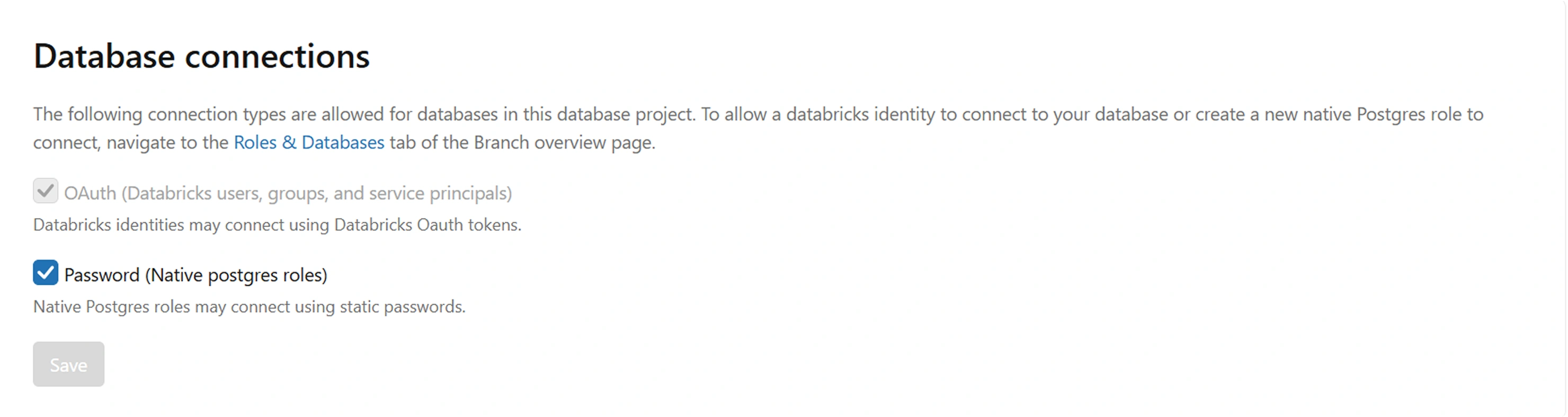
Figure 4.Connection types are configured per database project. OAuth-based Databricks authentication is supported, while password authentication for new projects is disabled by default and must be explicitly enabled.; password authentication is an explicit opt-in.
OAuth authentication - Databricks users, groups and service principals connecting with a Databricks token - is always on and cannot be switched off. Authentication with a native Postgres role and a static password is a checkbox somebody has to deliberately tick. That asymmetry is worth reading as guidance: identity-based access is the model the platform expects, and static passwords are a supported exception rather than the standard route.
Option A: A Native PostgreSQL Role with a Password
This is the familiar model: a role inside the database, a password, and a connection string any Postgres driver understands. Enabling it takes two steps - password authentication has to be allowed for the database project at all, and then the role itself is created from the Roles and Databases tab.
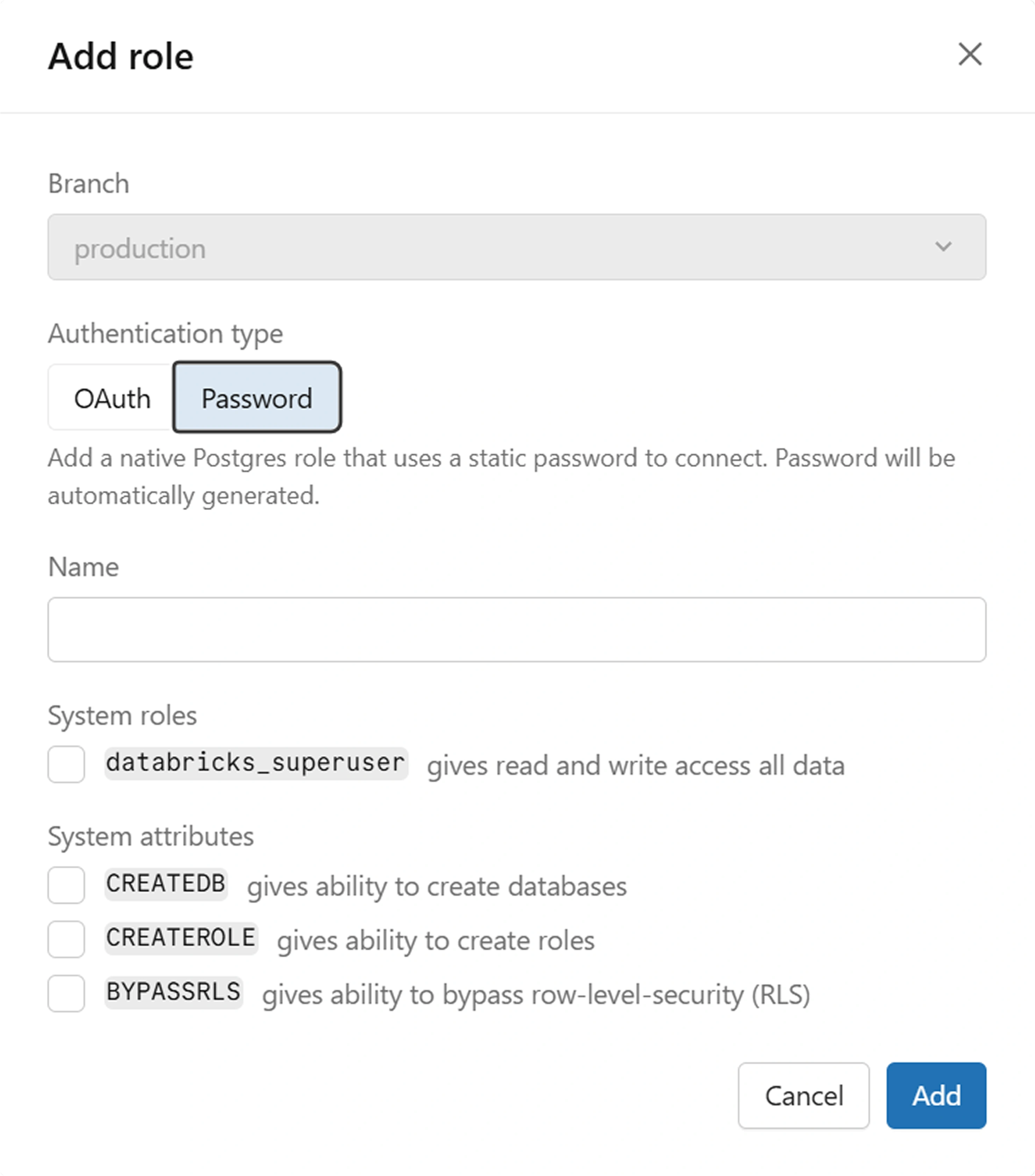
Figure 5. Creating a native Postgres role. The authentication type is fixed at creation, and the password is generated by the platform rather than chosen.
Two details there matter more than they first appear. The authentication type - OAuth or Password - is chosen when the role is created, so it is a property of the role rather than something toggled later. And the password is generated automatically and held in a secure vault rather than typed in, which quietly removes the most common way static credentials go wrong: somebody choosing a weak one and reusing it elsewhere.
Treat the system roles and attributes conservatively. Granting superuser gives the role read and write access to all data, and the create-database, create-role and bypass-row-level-security attributes each widen what it can do. An application that reads and writes its own tables needs none of them.
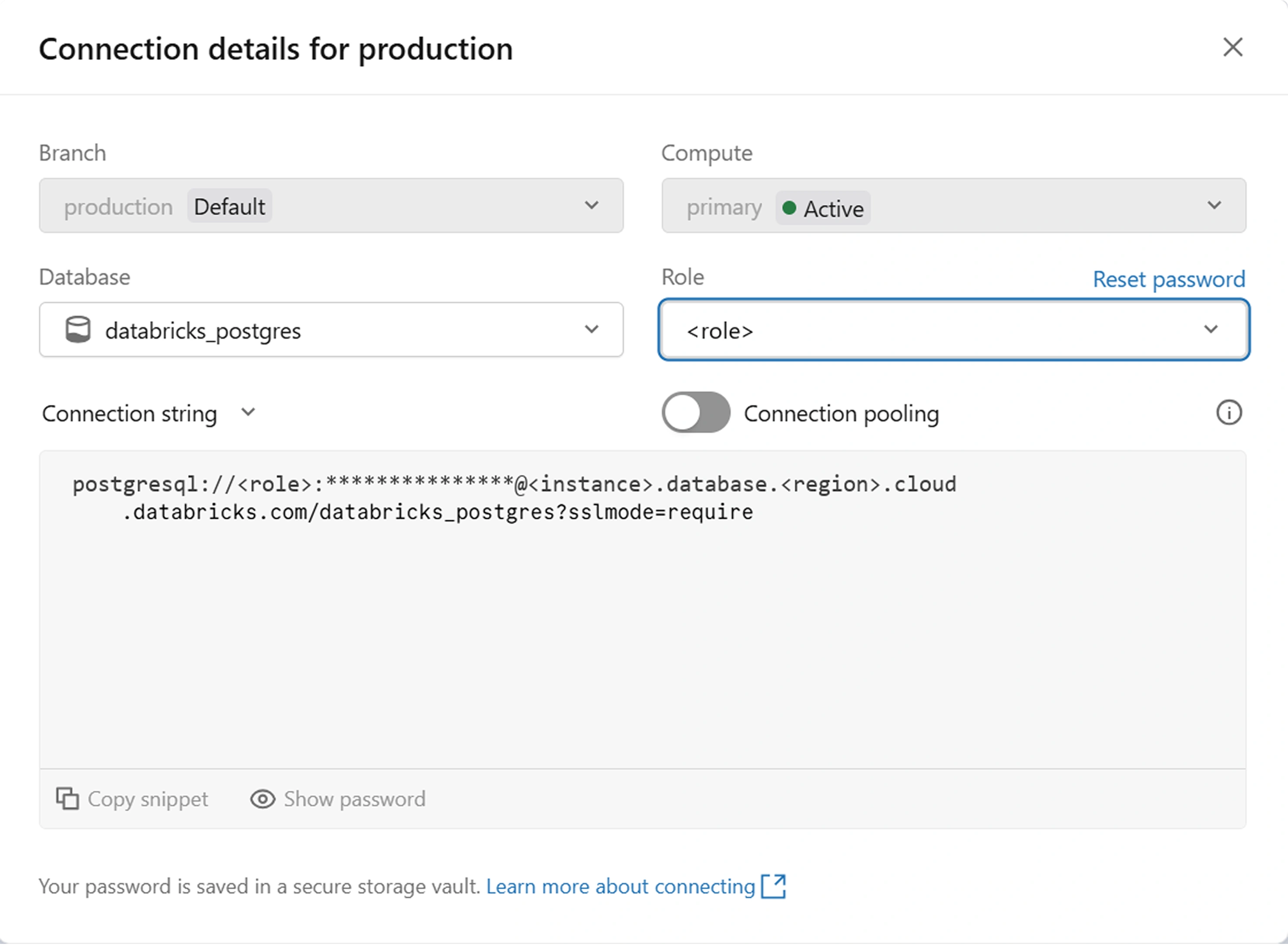
Figure 6. The generated connection string. Note the role selector, the password reset action, and the connection pooling toggle.
The connection string is an ordinary Postgres URI - role, password, host, database and sslmode. Nothing in it is specific to Databricks except the hostname, which is precisely why an existing driver connects to it unmodified. Three things on that dialog are easy to overlook and useful later: the role selector regenerates the string per role so each application can be issued its own, the reset action rotates a credential without recreating the role, and the connection pooling toggle matters for anything with a per-request connection model.
Option B: A Databricks Identity with an OAuth Token
The second method authenticates as a Databricks identity - a user, a group, or, for an application, a service principal. It needs no enabling because it is always available.
The mechanism is neat: the identity generates a short-lived OAuth token, and that token is supplied in the password field of an otherwise ordinary Postgres connection. The driver neither knows nor cares that the password is a token, which is why this works with exactly the same unmodified drivers as Option A.
The security posture is considerably better. The application has an identity rather than a secret. Access is granted and revoked in the same place as every other permission. There is no long-lived credential in a file to leak or forget about, and the audit trail leads back to a named principal instead of a shared database role.
The catch is lifetime. These tokens are short-lived - on the order of an hour - so the application needs somewhere to refresh them. If your code reads a connection string from configuration at startup and holds it, that connection will begin failing authentication about an hour after deployment.
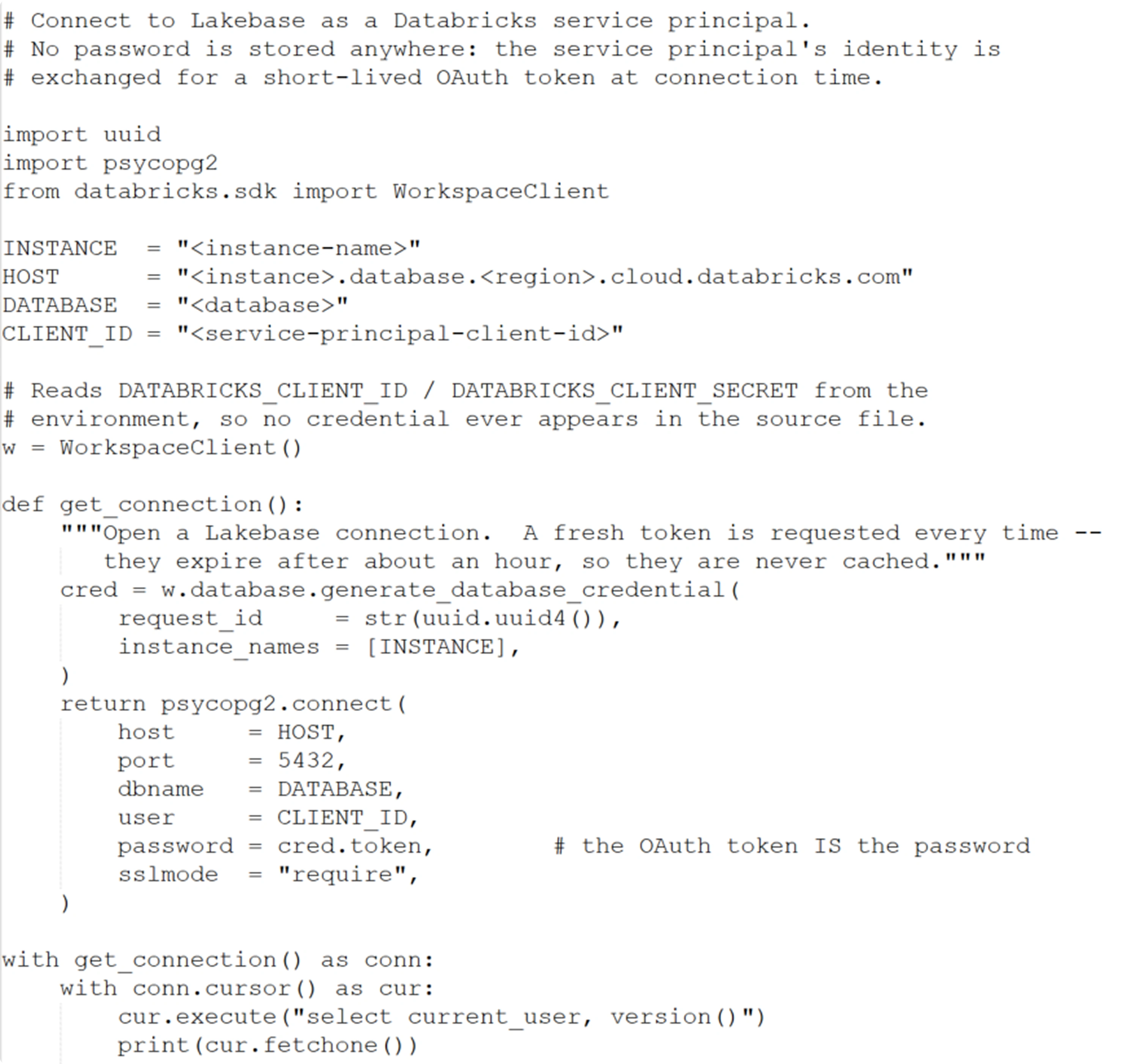
Figure 7. Authenticating as a Databricks identity. The token is short-lived, and it is supplied in the password field of an otherwise ordinary Postgres connection.
Comparing the Two Options
| Consideration | Native role + password | Databricks identity + OAuth token |
|---|---|---|
| Availability | Opt-in per database project | Always enabled |
| Credential | Auto-generated, held in a vault | Short-lived OAuth token |
| Lifetime | Until explicitly rotated | Around an hour |
| Refresh logic needed | No | Yes |
| Revocation | Reset the role's password | Central, with the identity |
| Audit trail | A shared database role | A named identity |
| Driver support | Any Postgres driver | Any Postgres driver |
| Best suited to | Legacy apps reading config at startup | Services with a connection layer |
What Comes Next in This Series
That is the theory. The rest of this series is the practice - one application per part, each with the code that changed, the architecture before and after, and screenshots of the application running against both databases.
Part 2 takes the first of the applications: a Perl CGI tool moving from SQL Server to Lakebase. It covers the architecture before and after, how the application connects to each database, what actually changed between the two builds, and the application running against both. Parts 3 to 6 follow the same shape, one application each, ending with a new application built directly on Lakebase.