





The Legacy Application Problem
Every organisation runs a handful of applications that nobody wants to touch. They are ten or twenty years old. They were written by someone who has since left. They have no tests, no documentation and no place on any roadmap - because they work, and because the people who depend on them depend on them every day.
Then something moves the ground underneath. A licence comes up for renewal. A version goes out of support. A datacentre is closing, or the organisation decides its data should live in one place instead of six. The database has to move.
At that point the conversation stops being about the database. Everybody in the room already knows how to move a database. The question is what happens to the application sitting on top of it - and the honest answer, most of the time, is that nobody knows.
What makes it feel risky is usually some combination of these:
The credentials are in the code
Not in a configuration file - in a library, next to the business logic, in a file thousands of lines long.
The SQL is written in one vendor's dialect
Bracketed identifiers, vendor-specific functions, a paging syntax that only that engine accepts.
The queries are scattered
Not behind a data access layer. Inline, in every screen.
The application is not the only thing connecting
A spreadsheet refreshes off the same database. So does a report, and probably a scheduled job. Nobody has the list.
So it gets priced as a rewrite
And a rewrite of something nobody fully understands does not get funded. The tool stays where it is, and the migration is deferred another year.
That estimate is usually wrong, and it is wrong in a specific way. What it costs to move an application to a new database has very little to do with how large the application is. It has to do with how many places in it open a connection. Where the answer is one, the migration is a configuration change rather than a rewrite.
This part takes one such application and moves it.
Scope of This Part
Part 1 argued that Lakebase speaks the PostgreSQL wire protocol, so an application that can already talk to PostgreSQL connects to it with no special client and no platform-specific driver. Everything below is that claim tested against an application that was never written with it in mind.
The scope here is deliberately narrow. Two architectures, two connection functions, and the application running against both - then a third build that keeps the database and changes the runtime instead. Everything else - dialect translation, paging, access control - is a topic in its own right and is left for later parts.
A note on what you are looking at. The application below is a stand-in, written for this series so the code can be published in full. It is modelled closely on a production system that was migrated for real: same language, same architecture, same techniques.
The Application
It is an order desk tool. Users search and filter a list of orders, open one, change it, and save. There is a create form, a customer lookup screen, and a CSV export. In other words it is almost entirely CRUD, with one list screen that has to stay quick over a large table.

Runtime
Perl CGI, one process per request - so the application cannot pool connections, which is a real constraint and worth naming early.

Schema
A schema called order_ops with customers, orders, a status lookup, and a view that derives a priority level from each order's required date.

Volume
500 customers and 500,000 orders, generated server-side so both databases hold identical rows.

Structure
One shared library holds the connection function and the page furniture. Every screen is a small script that uses it. That structure is the reason this migration stayed small.
As Is: Perl on SQL Server
The starting picture is the one most internal tools still look like. The application reaches a SQL Server database over ODBC. A spreadsheet reaches the same database over its own ODBC connection, separately from the application - which matters, because it means the database is a shared integration point and not simply the application's private storage.
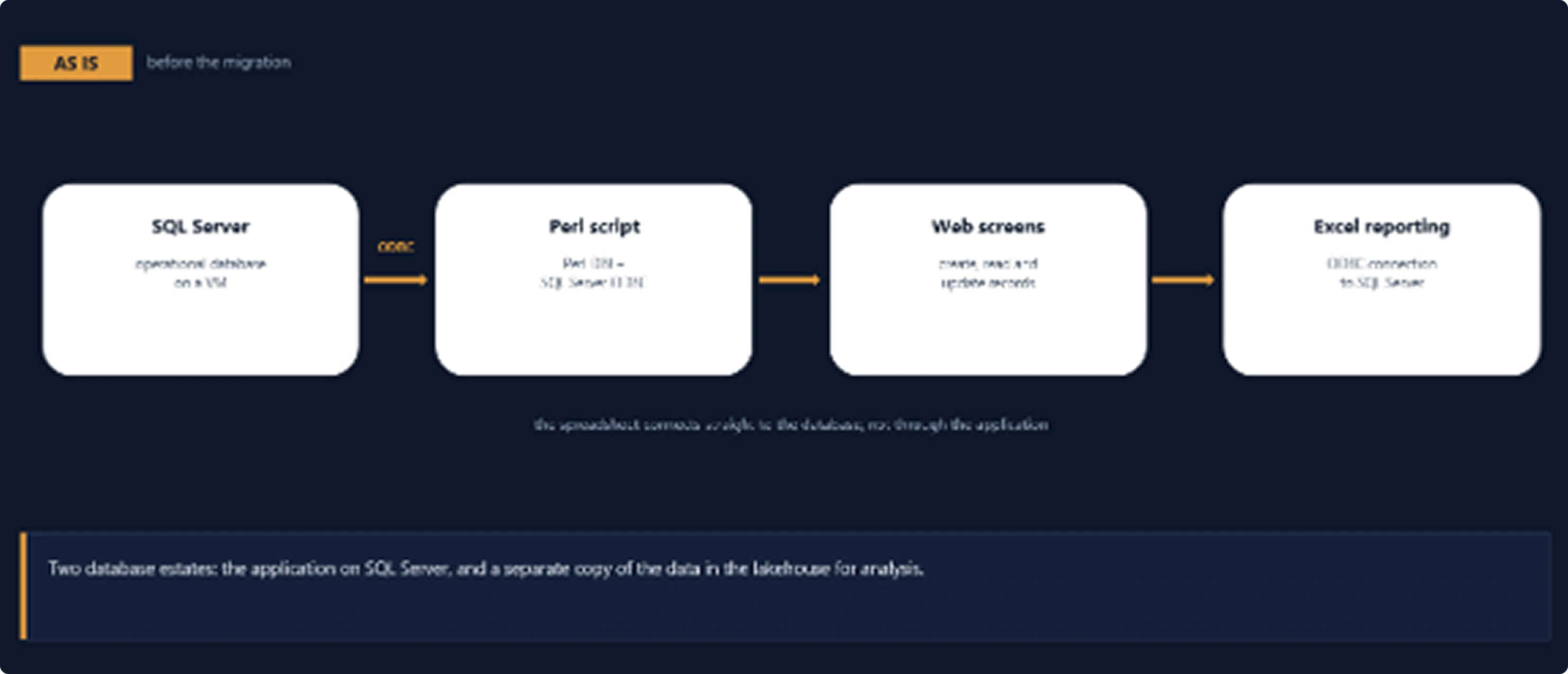
Figure 1. The application and the spreadsheet each connect to SQL Server over ODBC. The spreadsheet does not go through the application.
How the Application Connects to SQL Server
One function opens the connection. It reads its settings from a configuration file, builds an ODBC connection string, and hands it to DBI. That is the whole of it.
my $driver = Cfg('MS_DRIVER', 'ODBC Driver 17 for SQL Server');
my $server = Cfg('MS_SERVER');
my $db     = Cfg('MS_DB');

my $dsn = "dbi:ODBC:DRIVER={$driver};SERVER=$server;DATABASE=$db;";
$dsn .= sprintf('UID=%s;PWD=%s;', Cfg('MS_USER'), Cfg('MS_PASS'));
$dsn .= sprintf('Encrypt=%s;TrustServerCertificate=%s;',
                Cfg('MS_ENCRYPT', 'yes'), Cfg('MS_TRUST_CERT', 'no'));

$dbh = DBI->connect($dsn, '', '', {
    RaiseError => 1, PrintError => 0, AutoCommit => 1,
}) or die "SQL SERVER CONNECT ERROR: $DBI::errstr\n";
Lib_Common.pl - the SQL Server build
Four things go into the connection string: a driver name, a server, a database, and credentials. The demo authenticates with a SQL login and requires encryption, which is what a managed SQL Server expects; the same function will use Windows authentication instead when the configuration asks for it, which is the usual arrangement against an instance on your own network.
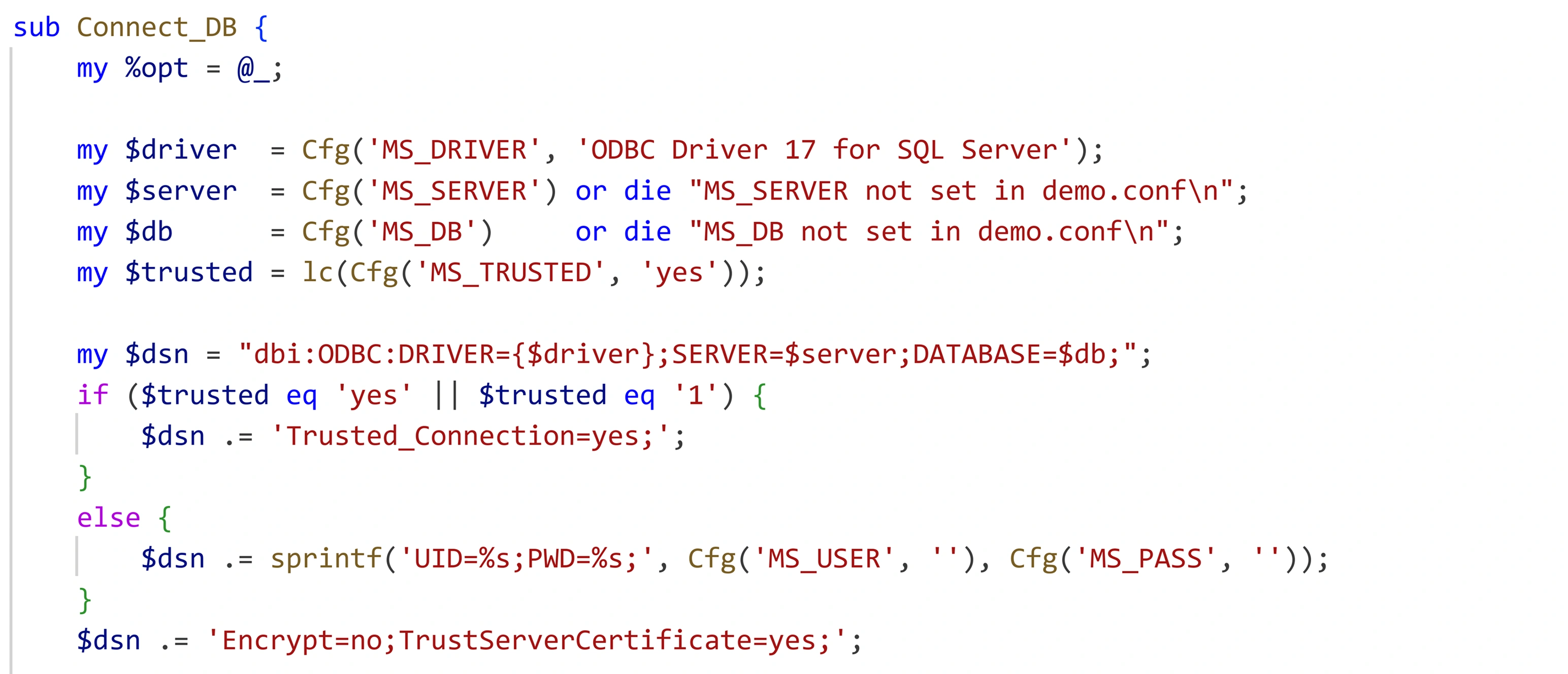
Figure 2. The whole connection: a driver name, a server, a database, a SQL login, and encryption.
A preflight script proves the wiring before any screen is opened. It reports the driver, the server version, the connected identity, the row counts, and runs one of the application's own queries end to end.
Figure 3. Driver, server version, identity, row counts, and one of the application's own queries run end to end.
To Be: Perl on Lakebase
After the migration the shape is unchanged. The database moves into the platform, and the application and the spreadsheet still connect directly to it, each with its own connection. What changes is what sits in the first box.
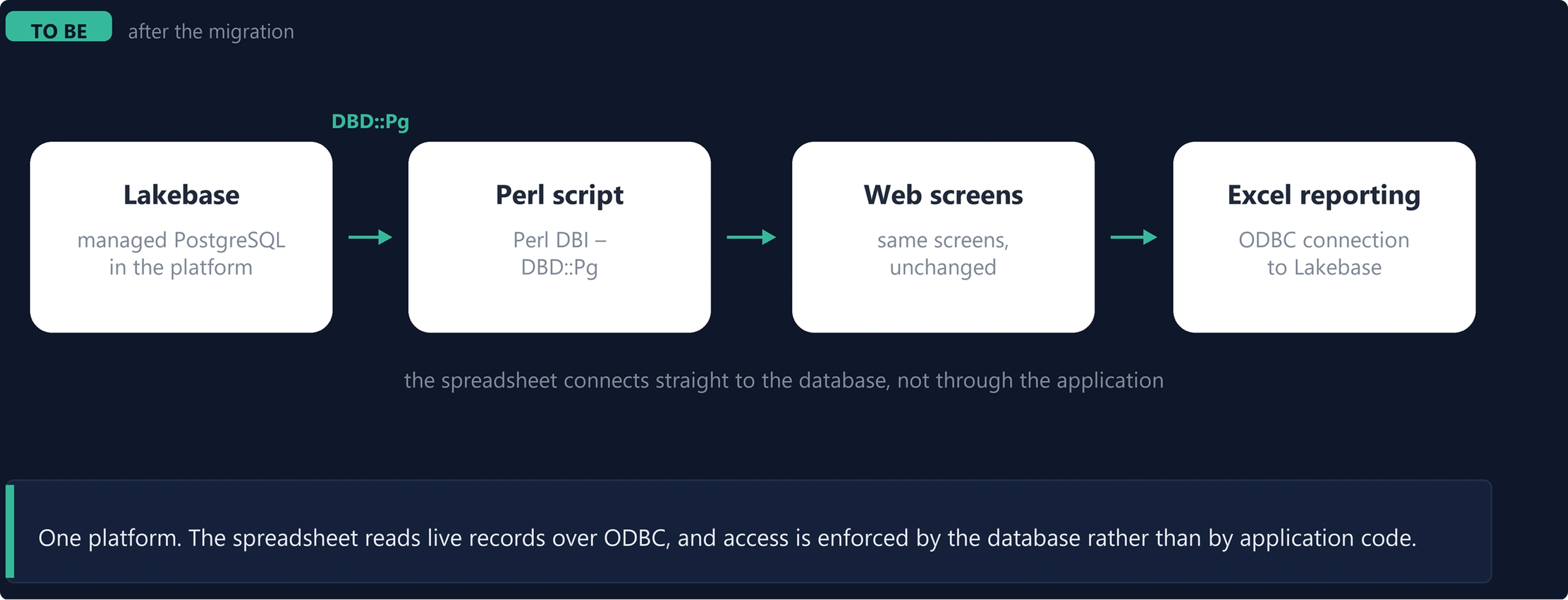
Figure 4. The same application and the same spreadsheet, now connecting to Lakebase. Only the first box changed
How the Application Connects to Lakebase
The same function, in the other build. It reads the same kind of configuration and hands DBI a PostgreSQL DSN instead of an ODBC one. There is no Databricks client library involved - this is the standard PostgreSQL driver for Perl, connecting the way it would to any PostgreSQL server.
my $host = Cfg('LB_HOST');
my $port = Cfg('LB_PORT', '5432');
my $db   = Cfg('LB_DB');
my $ssl  = Cfg('LB_SSLMODE', 'require');

my $dsn = "dbi:Pg:dbname=$db;host=$host;port=$port;sslmode=$ssl";

$dbh = DBI->connect($dsn, $user, $pass, {
    RaiseError => 1, PrintError => 0, AutoCommit => 1, pg_enable_utf8 => 1,
    Callbacks => {
        connected => sub { $_[0]->do("SET search_path TO $schema, public") },
    },
}) or die "LAKEBASE CONNECT ERROR: $DBI::errstr\n";
Lib_Common.pl - the Lakebase build
Two details in there are doing real work.
sslmode=require.
Encryption is not optional, and stating it in the DSN means you find out at connect time rather than later.
The search path
Set once as the connection opens, so queries that name tables without a schema prefix resolve correctly - without editing a single query.
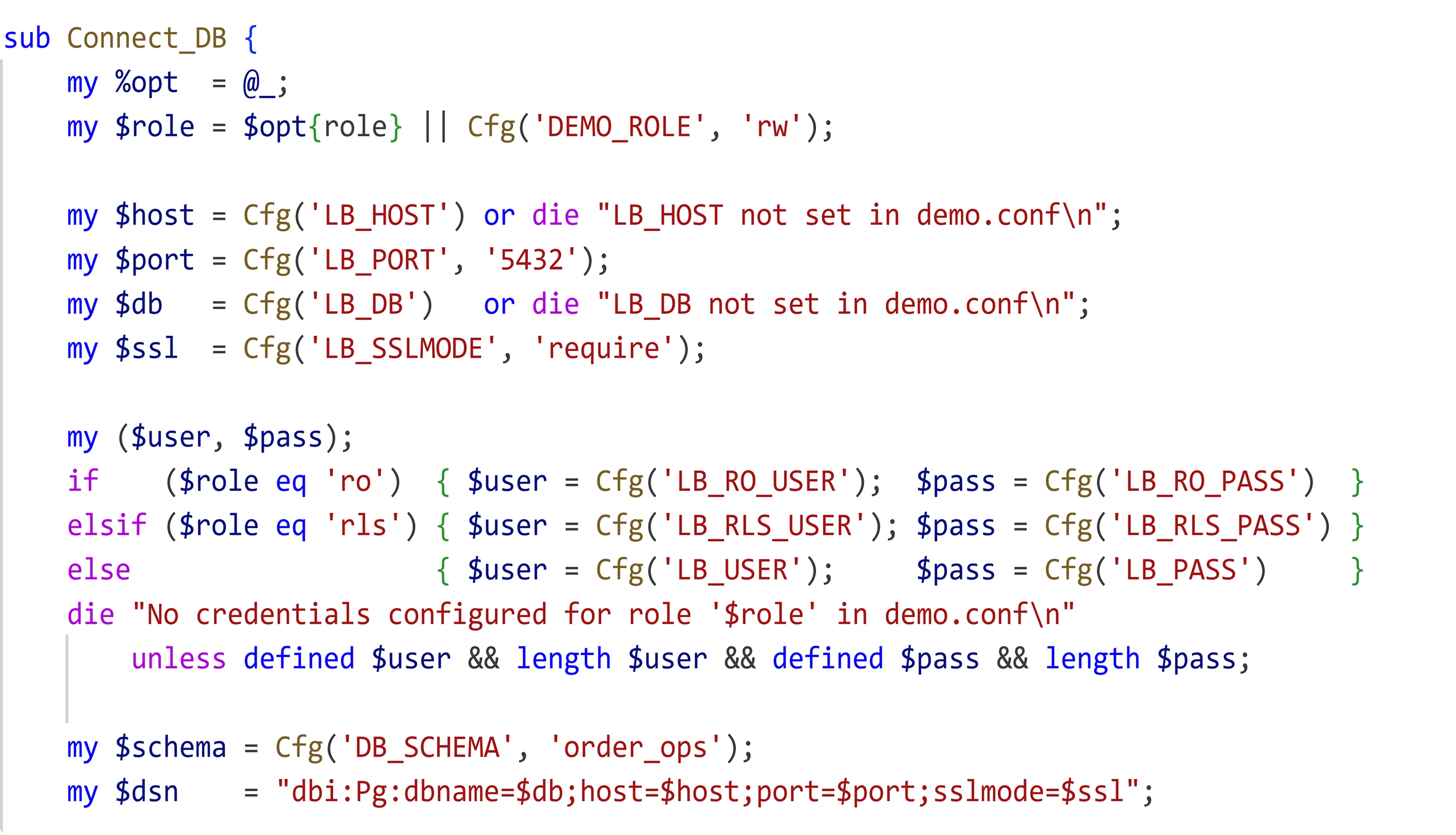
Figure 5. The same function in the other build. Credentials still come from configuration; the DSN is what differs.
The same preflight script, unchanged, against the new database. It reports a PostgreSQL version and the connected role rather than a SQL login, and - the point of the exercise - the same row counts and the same rows from the same query.
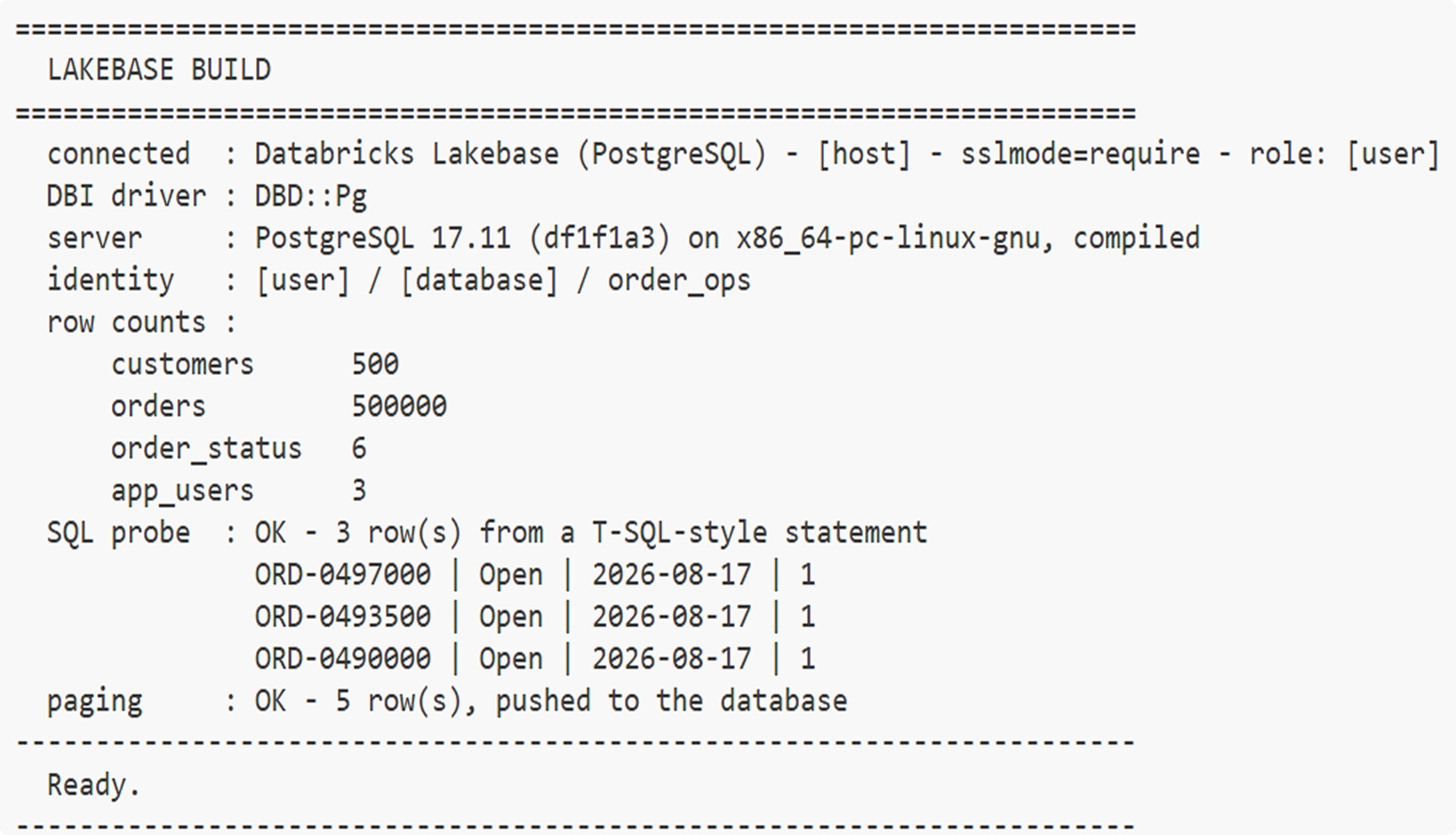
Figure 6. The same preflight against Lakebase: PostgreSQL version, the connected role, the same row counts, and the same application query returning the same rows.
Neither build has a hostname, username or password anywhere in its Perl. Both read a configuration file that is kept out of source control. That is worth doing regardless of which database you are on, and it is what makes switching between the two a matter of editing one file.
One thing to explain about the output above and the screens that follow: the host, database and login print as placeholders rather than real values. That is the demo masking them deliberately, so its screens can be published. It is a property of this demo, not of Lakebase.
The Change Footprint
This is the part worth pausing on. The two builds sit in two folders. Comparing the application scripts between them gives a short answer.
identical   check_prereqs.pl
identical   customers.pl
DIFFERS     Lib_Common.pl
identical   orders_list.pl
identical   order_edit.pl
identical   order_new.pl
identical   security_demo.pl
identical   seed_data.pl
identical   serve.pl
identical   test_connection.pl
Nine application scripts, byte-identical. One library file differs.
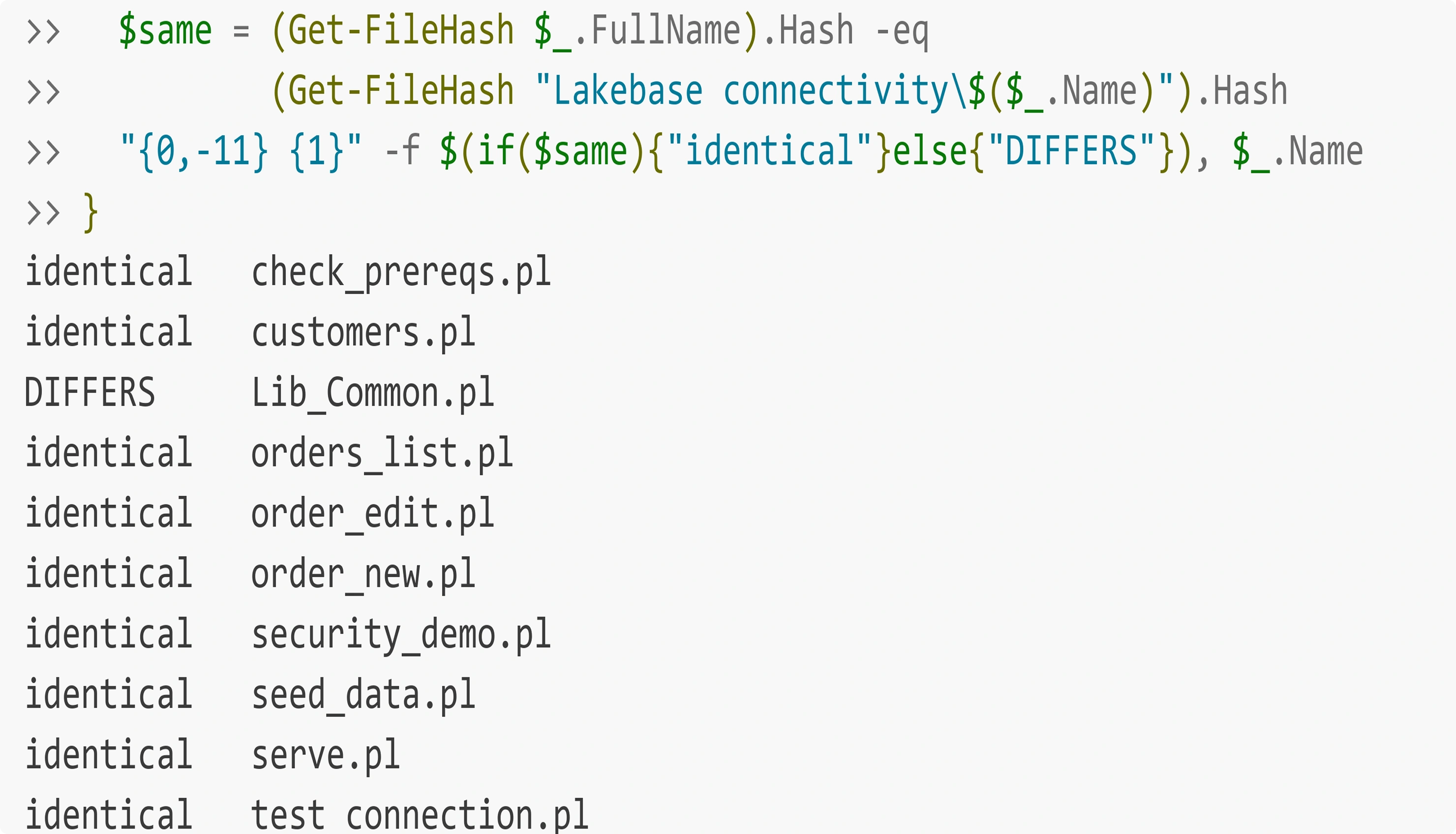
Figure 7. Nine application scripts, byte-identical. One library file differs. That is the entire migration surface.
The list screen, the create form, the edit screen, the customer lookup, the CSV export, the local web server and the preflight script are the same bytes in both folders. Every query in them is the same string. Only the file that opens the connection is different - along with the configuration file, and the schema DDL, which genuinely does differ because identity columns are declared differently in the two databases.
From the production migration this demo is modelled on: the equivalent library grew from 3,893 lines to 3,982 - 89 lines added, in one function - and not a single query was rewritten by hand. No other file in the application changed.
The Application Running on Both Databases
Because the two builds are separate folders, both can run at the same time on different ports. Every page carries a banner naming the backend it is talking to, which makes a screenshot self-evidencing: you do not have to take my word for which database produced the grid.
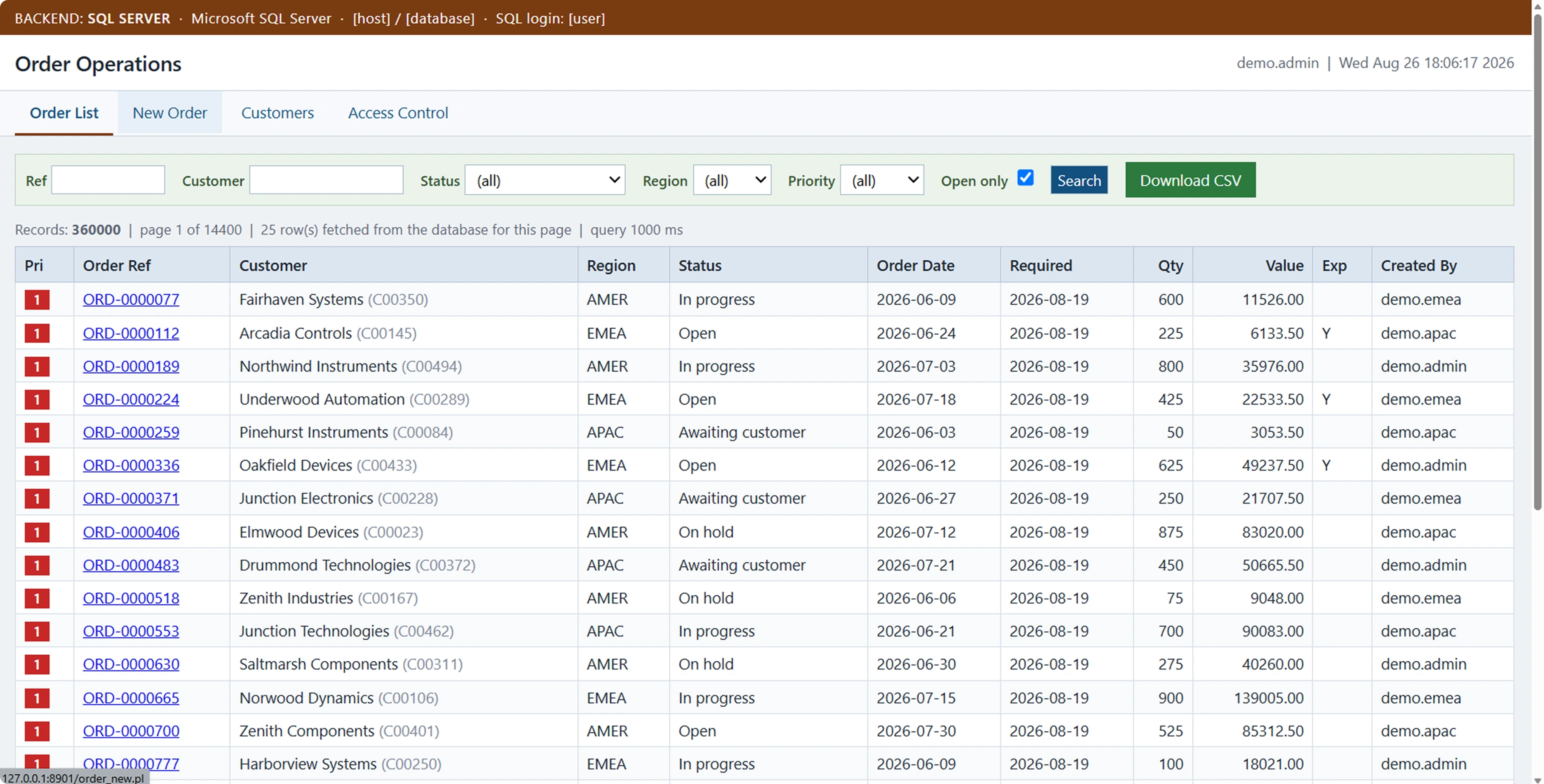
Figure 8. Filters applied, sorted by priority. The banner names the backend.
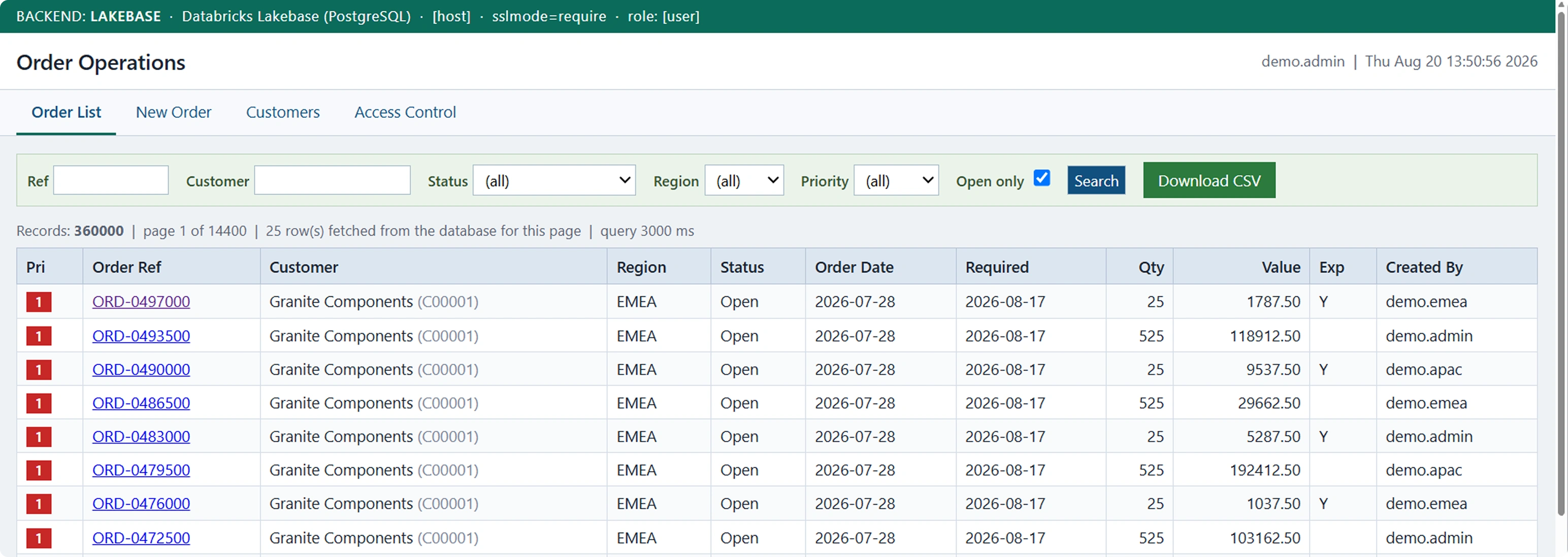
Figure 9. The same filters, the same page, the same sort - the same rows. The only difference on screen is the banner.
That pair is the point of the whole exercise. Same URL path, same filters, same result set, and no application code in between - the two screens are produced by the same bytes.
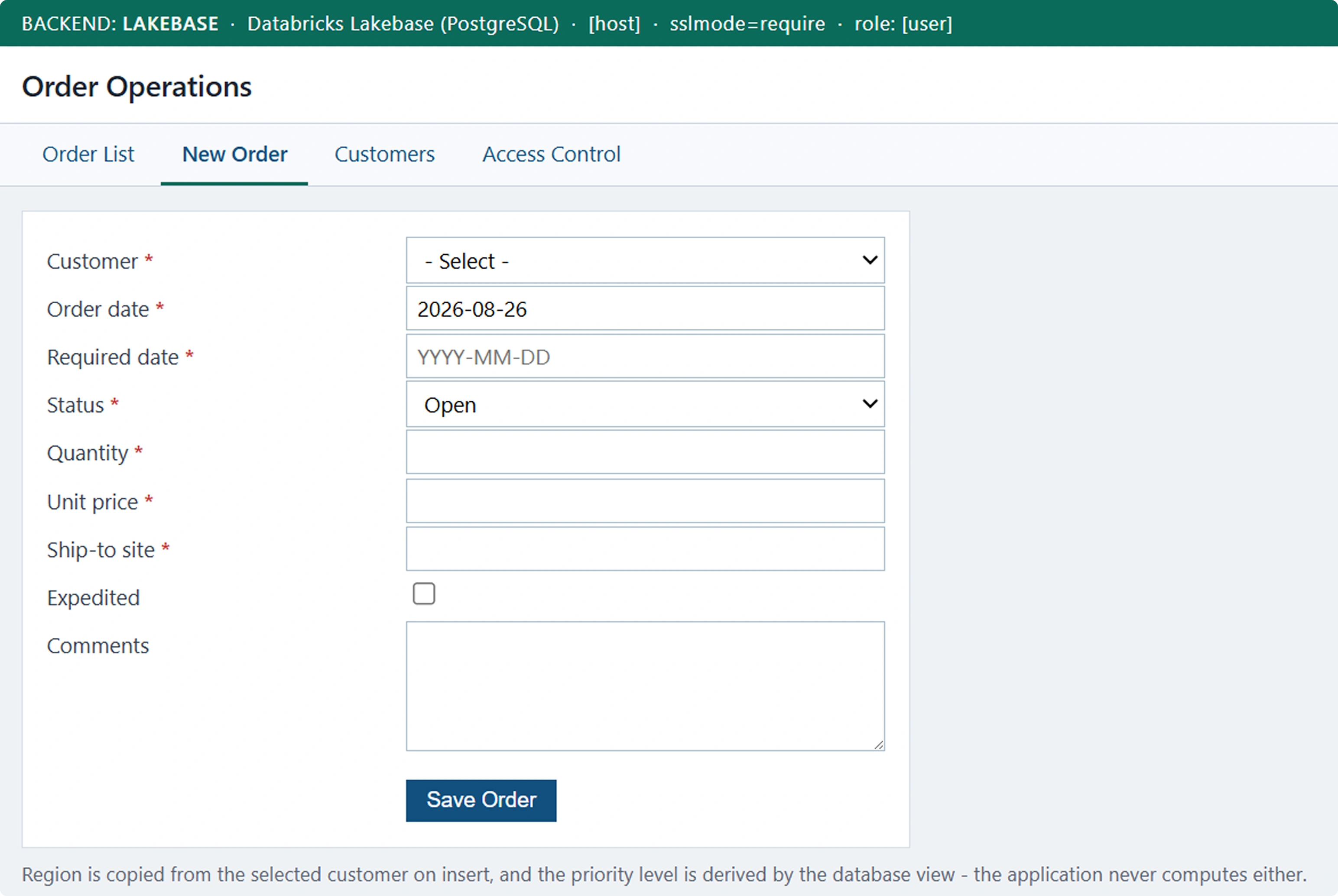
Figure 10. The write path: required-field validation, dropdowns fed from lookup tables, and a single parameterised INSERT.
Migrating the Application to a Databricks App
Everything up to here has kept the application where it was. The database moved into the platform; the Perl scripts stayed on the server they had always run on. That server is still yours - to patch, to keep reachable, to keep running.
Databricks Apps is the platform's own place to run a web application. You give it the code, and it runs the process, serves it over HTTPS behind workspace authentication, and hands it the connection details for whatever you attach to it. So there is a third option worth looking at: move the application in as well.
The honest part first, because it decides whether any of this is interesting to you. Databricks Apps runs Python and Node applications. There is no Perl runtime, so CGI scripts cannot be lifted across - moving this application means rewriting it. What does not move is the database. It is already Lakebase, already holding the same order_ops schema and the same 500,000 rows, and this step does not touch it.
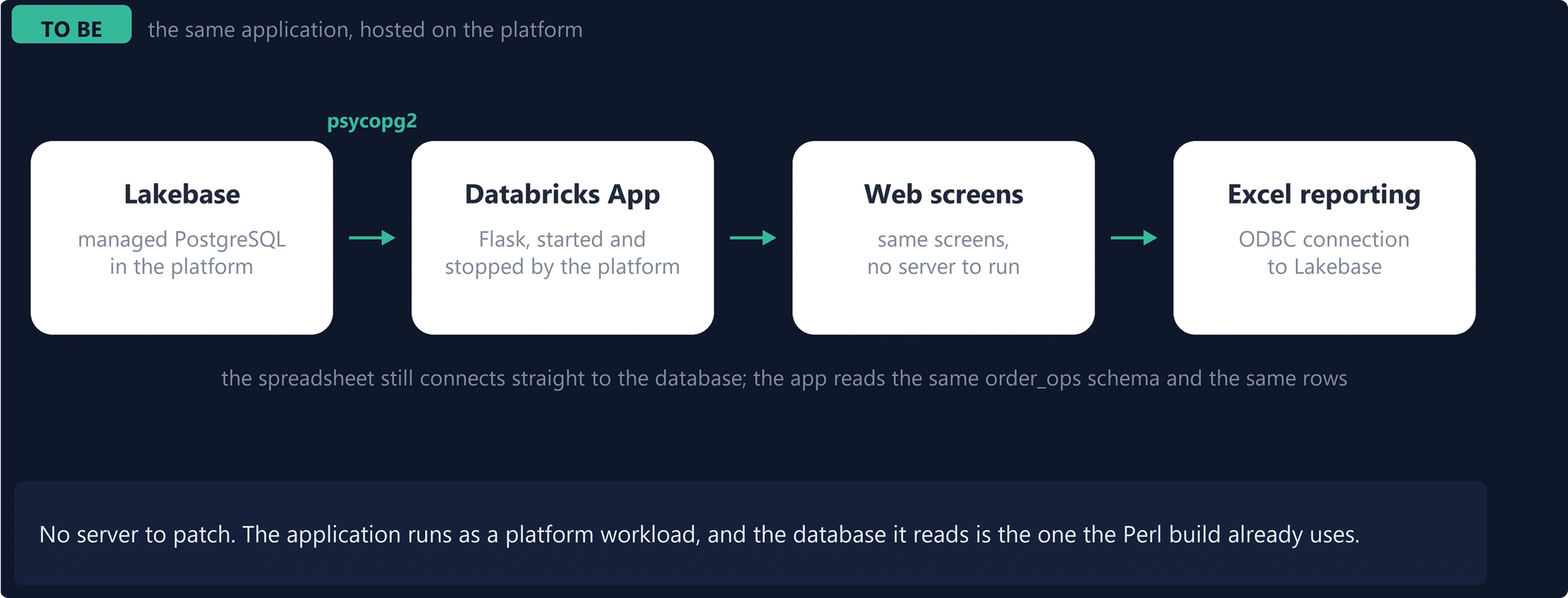
Figure 11. The database is unchanged from Figure 4. What changes is the box next to it: the application becomes a workload the platform starts and stops, rather than a process on a server you own.
Scope of the Rewrite
Set against the second build, the change is narrower than “rewrite the application” makes it sound.
| Perl on Lakebase | Databricks App on Lakebase | |
|---|---|---|
| Application code | a server you maintain runs it | a process the platform starts |
| The database | Lakebase, schema order_ops | the same instance, schema and rows |
| The SQL | written by hand | the same statements, the same shape |
| Where it runs | a server you maintain | a process the platform starts |
| Connection details | a config file on that server | injected by the platform |
| Connections | one process per request, cannot pool | a long-lived process, pooled |
| How users reach it | your own web server | HTTPS behind workspace authentication |
So the language and the screens change; the data, the schema and the queries do not. That is what makes the third build directly comparable with the second - same rows, same filters, different runtime.
How a Databricks App Connects to Lakebase
A Databricks App connects to Lakebase the way any client connects to any PostgreSQL server. Six values are needed and nothing else: host, port, database, user, password and sslmode. All that differs is where each one comes from.
| Value | Who supplies it | How |
|---|---|---|
| host, port, database | the platform | PGHOST, PGPORT, PGDATABASE, set for you |
| user, password | the application | a PostgreSQL role and its password |
| sslmode | fixed | require |
Attaching the Lakebase instance to the app as a resource is what sets the first three. That is worth stating plainly: the address is not configured in the application at all. The platform knows which address is routable from inside the app, and the public hostname shown in the workspace is not necessarily it.
The identity is the application's own. This build authenticates as a PostgreSQL role with a password - the same kind of credential the Perl build uses, and it can be the same role. Which makes the whole connection six lines:
conn = psycopg2.connect(
    host     = os.environ["PGHOST"],       # from the attached instance
    port     = os.environ["PGPORT"],
    dbname   = os.environ["PGDATABASE"],
    user     = os.environ["LB_USER"],      # the PostgreSQL role
    password = os.environ["LB_PASS"],      # its password
    sslmode  = "require",
)
lakebase.py - the whole connection
There is one way to get this wrong, and it is worth knowing in advance. Attaching the instance also sets PGUSER, and PGUSER holds the app's own service principal - a different identity from the role whose password you hold. A user and a password have to belong to the same identity, so a build authenticating as a role ignores PGUSER.
This raises a fair question. If the platform is offering the application an identity of its own, why not use it? You can. A Databricks App can ask the platform for a short-lived credential and pass that as the password instead, and then no secret is stored anywhere at all. This build does not, for one reason - supporting both at once meant every value had two possible sources, which was harder to explain than the connection it was explaining. One path, one source per value. Part 6 takes the other one properly.
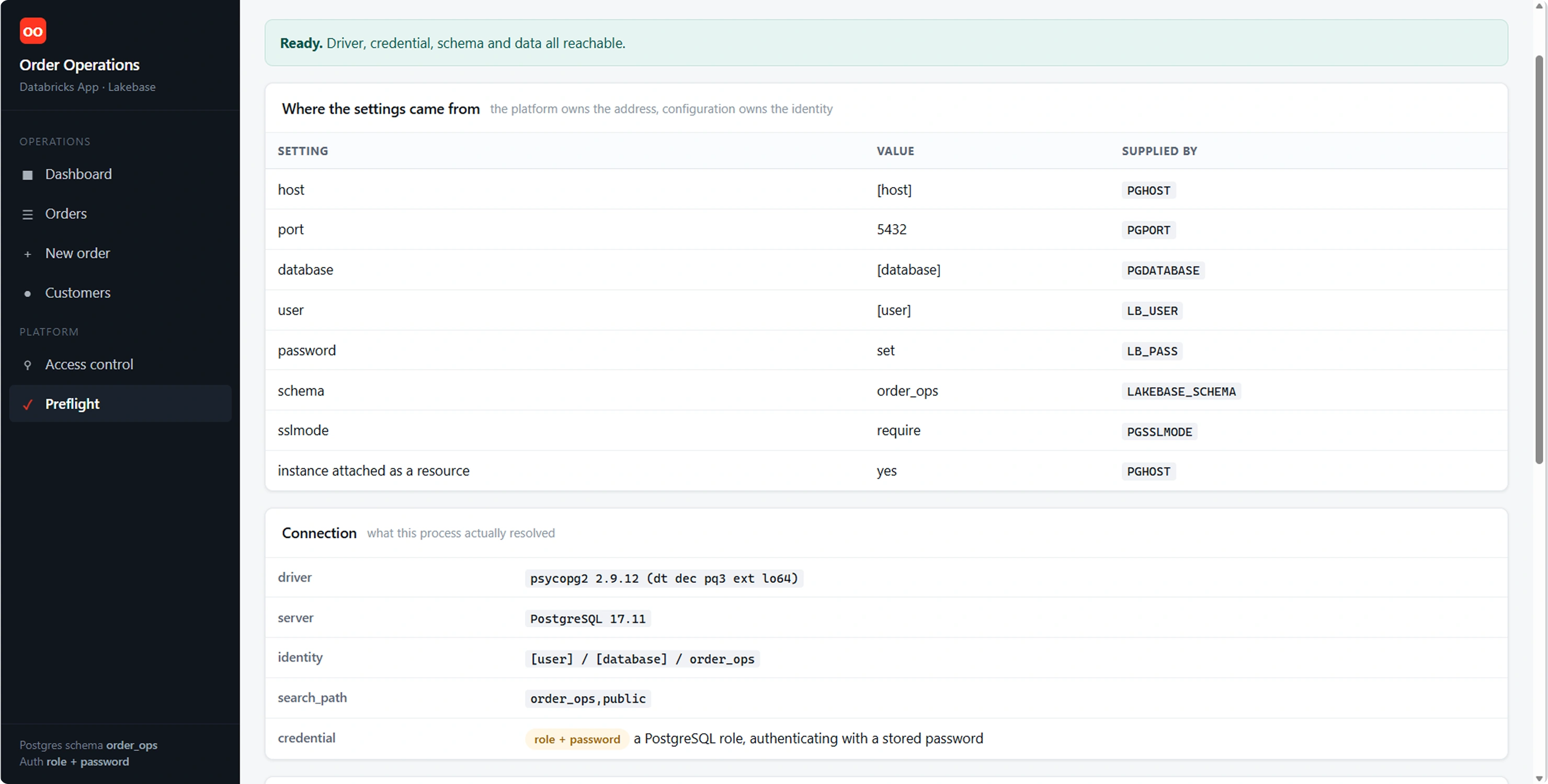
Figure 12. The same idea as Figures 3 and 6, in the third build: what it connected to, and which environment variable supplied each value. The second column is what makes a misconfiguration obvious.
Advantages of the Databricks App Build
A rewrite has to pay for itself. What it buys:
No server to keep. No operating system to patch, no web server to configure, no certificate to renew. The platform runs the process and serves it.
Connections can be pooled. A CGI script cannot keep one: its process exits when the request ends, so every request pays for a fresh TCP connection and a fresh TLS handshake. A long-lived process holds a pool and hands connections out. Against a managed endpoint reached over TLS this is the largest behavioural difference between the two builds.
Connection details stop being configuration. Attach the instance and the address arrives. Nothing to copy per environment, and no way to point at the wrong database by editing the wrong file.
Access is workspace access. Who may open the application is managed where everything else in the workspace is managed, rather than in a web server's own configuration.
The application sits beside the data. The app, the operational database and the lakehouse are in one platform under one permission model - instead of an application estate on one side of an integration boundary and the data on the other.
Deploying is a sync, not a server change. Push the folder and deploy. No files copied onto a machine, no service restarted by hand.
Against that, the costs. The rewrite is real work, and for a Perl codebase it is the whole cost of this step - none of it comes across. Beyond that, an application that has been idle takes a few seconds on its first request while its compute and the database instance wake up, which on an interactive screen is visible.
The Application Running as a Databricks App
The same test as before. Same filters, same sort, same page of the same table.
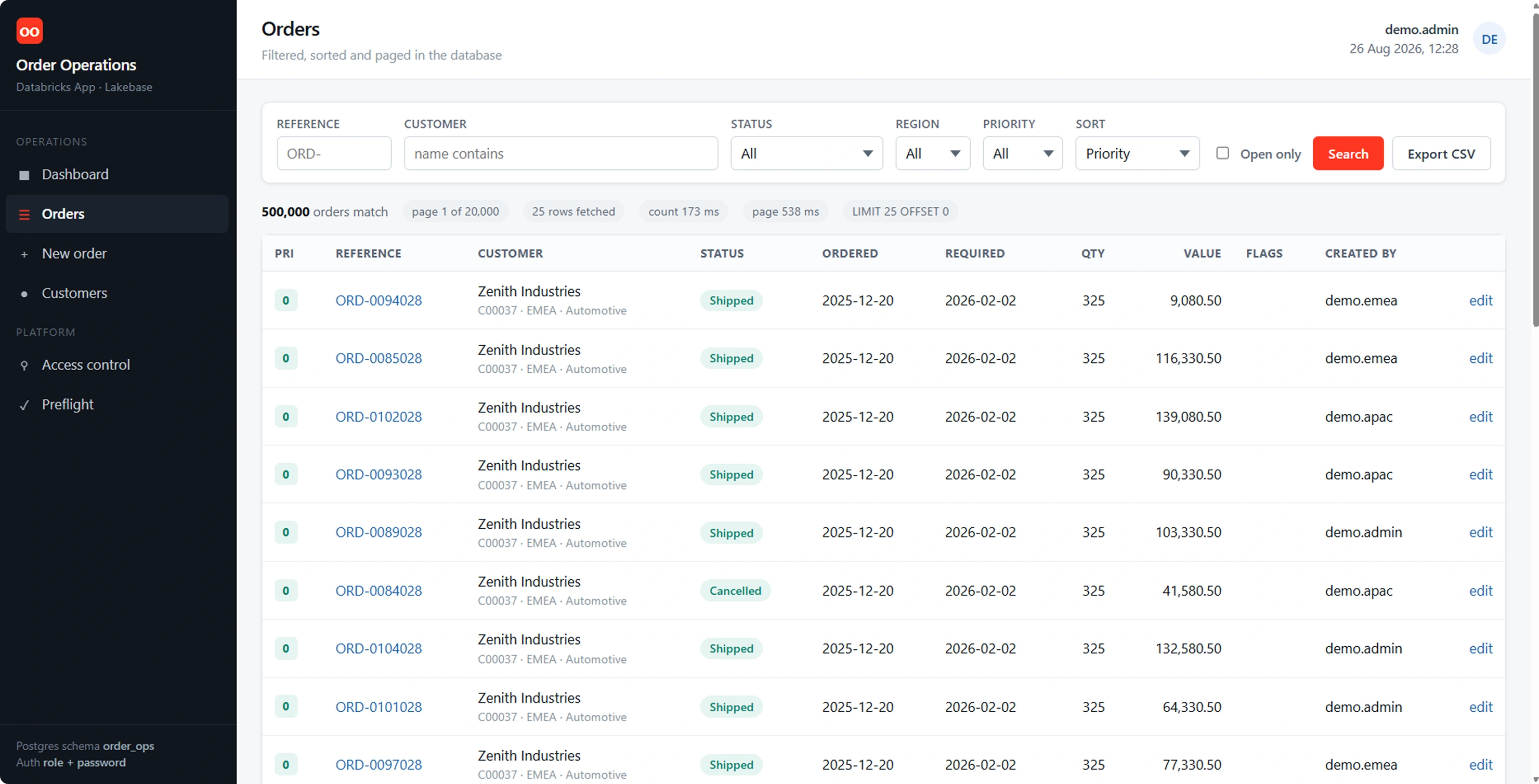
Figure 13. The same filters and the same sort as Figures 8 and 9, in a third runtime, against the same database - and the same rows.
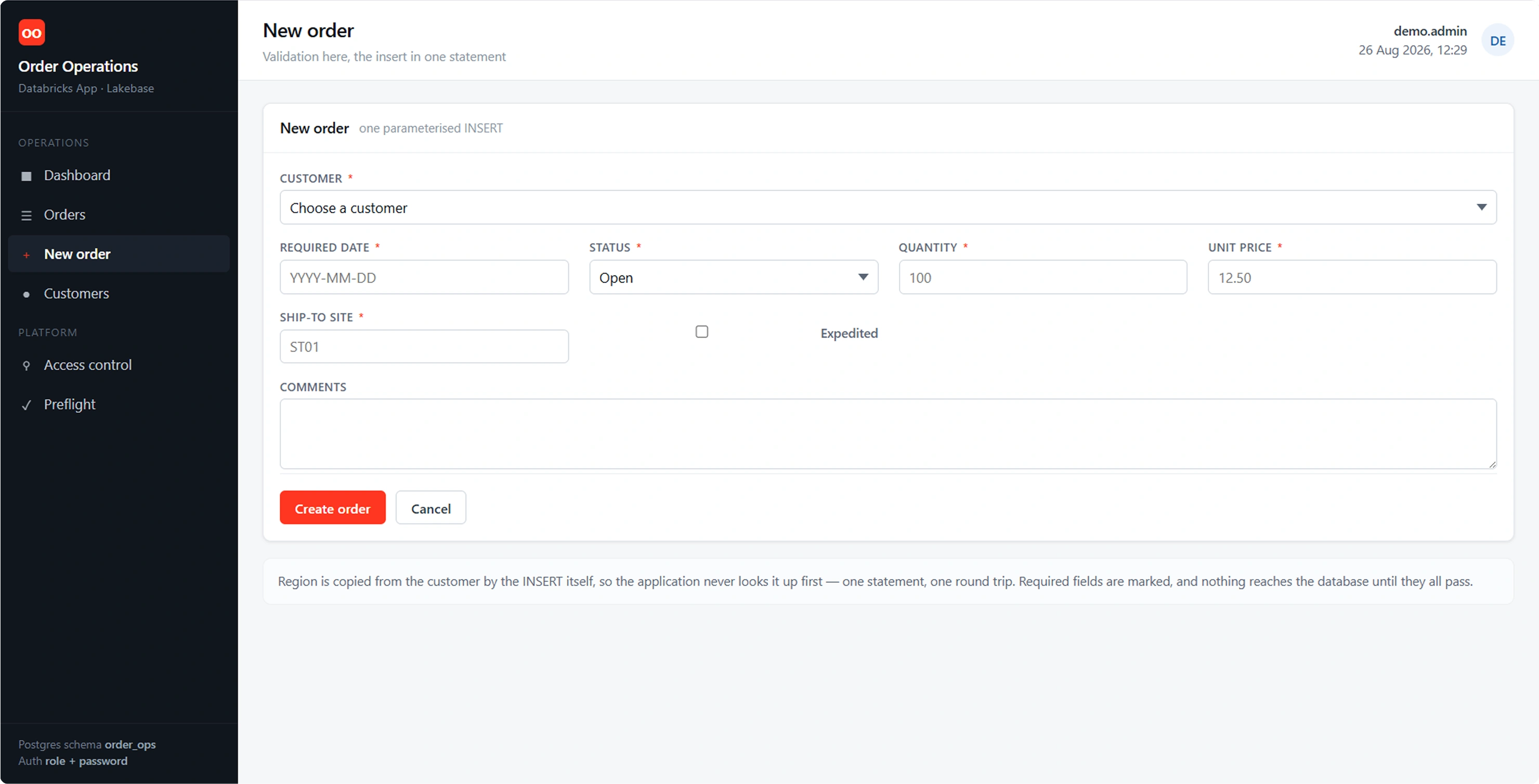
Figure 14. The write path in the third build: the same required-field validation, the same dropdowns fed from lookup tables, the same single parameterised INSERT.
None of this is the same code as the Perl build - different language, different framework, written rather than migrated. That is the point worth being clear about: the rewrite was not free, and the database was not the reason for it. The database did not care which runtime was asking, and both builds read the same rows at the same time.
Conclusions
A Perl application that had been talking to SQL Server for years now talks to Lakebase, and the difference is one file: the function that opens the connection. The screens, the queries and the business rules are untouched, and the proof is that the two folders differ in exactly one script.
That is the practical meaning of wire-protocol compatibility. It is not a claim that every migration is this small - the next parts get into what does have to change - but the connection layer, the part people expect to be hard, is the part that turns out to be a configuration exercise.
The third build makes the other half of the point. Lakebase does not require the application to live anywhere in particular. The Perl build reaches it from a server you maintain; the Flask build reaches it as a workload the platform starts on demand. Same database, same schema, same rows, two very different deployment models - and the only thing that genuinely had to be reasoned about was which side owns the connection details.